Gantt Charts as Code: Mermaid, Make and the Weekly Progress Report
The plan on a page, kept honest by a text file and a build step

Every Friday morning for about two years I updated the same Gantt chart.
It lived in a drawing tool. Not a scheduling tool, a drawing tool, because the real plan was in a system nobody outside the programme office could open, and the thing the steering group actually looked at was a single page with coloured bars on it. So every Friday I would open the file, drag a bar a bit further to the right, recolour one from amber to green, nudge the ones underneath it so they didn’t overlap, notice that the whole thing no longer fitted the page, shrink the font, export a PNG, and paste it into the report.
Twenty minutes, most weeks. Longer if something had genuinely moved.
The worst part wasn’t the twenty minutes. It was the weeks I skipped. When updating a diagram is fiddly, you update it less often, and a plan that’s three weeks stale is worse than no plan at all, because people believe it.
Diagrams as code
Mermaid is a way of writing diagrams as plain text. You describe what you want in a small, readable syntax, and a renderer turns it into a picture. If you’ve written Markdown you’ll find it familiar: the source is something a human can read and a machine can draw.
It handles flowcharts, sequence diagrams, entity relationship diagrams, state machines, and — the reason we’re here — Gantt charts.
The point isn’t that the syntax is clever. The point is that the diagram becomes a file. Once something is a file in your repository it inherits everything your repository already does: version history, branches, pull requests, review, continuous integration. You stop managing a diagram and start managing text, which your tooling is already very good at.
The chart
Here’s the plan I’d have been dragging around in a drawing tool, written as Mermaid instead. Bear with the syntax; I’ll unpack it underneath.
gantt
    dateFormat  YYYY-MM-DD
    axisFormat  %d %b
    title       Casework Service - plan as at 5 October 2026
    excludes    weekends

    section Discovery
    User research           :done,      res,    2026-08-03, 15d
    As-is service mapping   :done,      map,    after res, 10d
    Discovery report        :done,      disc,   after map, 5d

    section Alpha
    Prototype build         :done,      proto,  after disc, 20d
    Accessibility audit     :active,    a11y,   2026-09-28, 10d
    Alpha assessment        :crit,      alpha,  after a11y, 3d

    section Beta
    Assessment actions      :           fix,    after alpha, 10d
    Private beta build      :           pbeta,  after fix, 30d
    Private beta live       :milestone, live,   after pbeta, 0d
And rendered:
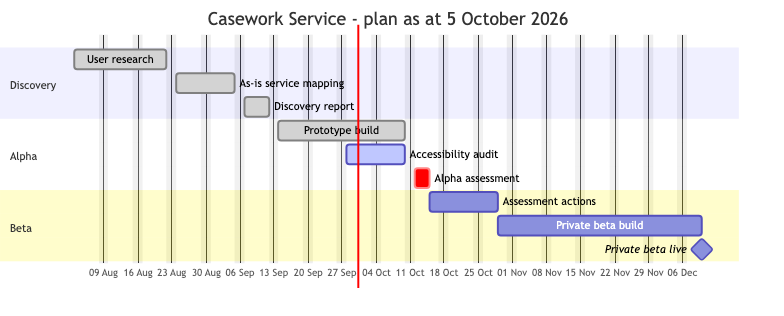
Reading the source top to bottom:
dateFormattells Mermaid how to read the dates you write;YYYY-MM-DDis the sane choice.axisFormatcontrols how they’re printed along the bottom, so%d %bgives you “05 Oct” rather than something American.excludes weekendscounts durations in working days. A ten-day task starting on a Monday finishes a fortnight later, which is what everyone in the room is assuming anyway.sectiongroups the bars. I’ve used the discovery, alpha and beta phases from the government service manual, but a section is just a heading; use whatever your programme calls things.- Each task line is
Name : state, id, start, duration. The state is optional and is one ofdone,activeorcrit.donerenders as a completed bar,activeas an in-progress one, andcritmarks something critical — I’ve used it for the alpha assessment, because if that slips, everything after it slips too. - The id is the handle other tasks refer to.
after a11ymeans “start when the accessibility audit finishes.” That’s the bit that saves the Friday morning. You don’t position bars; you state dependencies and let the renderer do the arithmetic. :milestonewith a zero-day duration draws a diamond rather than a bar, which is how you mark a date that matters rather than a stretch of work.
Now think about the weekly update. The accessibility audit finishes. I change one word — active to done — and everything downstream moves on its own. That’s a one-character-ish edit, not twenty minutes of nudging rectangles.
Making the picture build itself
Mermaid source is text. The report needs a PNG. Something has to do the conversion, and you very much do not want that something to be you, remembering.
This blog does it with Make — I wrote a whole post on why Make is still worth knowing (Makefiles - Still a Useful Tool) — and the relevant part of this repository’s Makefile is four lines:
MERMAID_SOURCES  := $(wildcard assets/diagrams/*.mmd)
MERMAID_DIAGRAMS := $(patsubst assets/diagrams/%.mmd,assets/images/%.png,$(MERMAID_SOURCES))

assets/images/%.png: assets/diagrams/%.mmd
	mmdc -i $< -o $@
That last rule is the heart of it, and it’s worth being precise about what each piece means, because pattern rules are the bit of Make that people nod along to without quite following.
assets/images/%.pngis the target: the file we want to end up with. The%is a wildcard that matches any stem —gantt-casework-plan, say.assets/diagrams/%.mmdis the prerequisite: the file the target is built from. The%here matches the same stem. So Make now knows thatassets/images/gantt-casework-plan.pngcomes fromassets/diagrams/gantt-casework-plan.mmd, without either filename appearing anywhere in the Makefile.$<is the first prerequisite — the.mmdfile.$@is the target — the.pngfile.
So the recipe reads: run the Mermaid CLI with the source as input and the image as output. The indentation in front of mmdc must be a real tab character. It always must. It has caught me more than once.
(The rule in this repository is a shade longer, because it also installs the Mermaid CLI and a headless browser on first run. That’s plumbing, not concept.)
The two variables at the top make it self-maintaining. wildcard finds every .mmd file in the diagrams folder, and patsubst rewrites that list into the matching list of PNGs. Drop a new source file in and it’s picked up with no edit to the build.
Make also checks timestamps: if the .mmd hasn’t changed since the .png was written, it doesn’t re-render. With a dozen diagrams and a headless browser doing the rendering, that’s the difference between a build you run and a build you avoid.
Wire that into CI — this blog rebuilds on every push to main — and the image in the published report is always generated from the source in the repository. It cannot go stale, because nobody is responsible for regenerating it.
What the team actually gets
The Friday morning saving is nice. The team-level benefits are better.
- The plan lives with the work. Same repository as the code and the architecture decision records, not a document library that needs a licence and a guess at which folder.
- Changes arrive as a diff. “What moved this week?” stops being a memory test and becomes
git log. You can see that the alpha assessment shifted by five days, who shifted it, and — if the commit message is any good — why. - The plan can be reviewed. A schedule change goes through a pull request like anything else, and a delivery manager can comment on a line. That’s a healthier conversation than being shown a finished picture in a meeting and asked if you agree.
- Nobody is the bottleneck. Anyone can edit a text file. The chart stops being a thing only the architect can update, which means it gets updated.
- It renders the same every time. No font substitution, no bars that drifted two pixels, no “which version is this?”
The architect is probably also a developer
I’ve written this as though the architect keeps the chart and the developers keep the code, because that’s how the org chart usually reads.
In practice the person editing the .mmd file is as likely as not the one who wrote the pattern rule that renders it, and who’ll be in the codebase that afternoon. The line between architect and developer has never been as solid as job titles imply, and tools like this blur it further — which I think is a good thing. A plan maintained by someone who is also building the thing tends to be a more honest plan.
If you’re a developer being asked to produce a progress chart, you already have the skills. If you’re an architect who hasn’t touched a Makefile in a while, this is a very gentle way back in.
Where this stops being a good idea
I should be straight about the limits, because I’ve seen this oversold.
Mermaid Gantt is a communication artefact. It is a one-page picture of the plan, suitable for a progress report, a wiki page or a wall. It is not a scheduling tool.
It has no resource levelling: it doesn’t know that two of those bars need the same person and therefore can’t overlap. It won’t compute a critical path — crit is a colour you apply by hand, on your own judgement. There’s no baseline-versus-actual, no float, no calendar of people’s leave. Dependencies are limited to “starts after this finishes,” one of the four relationships a real planner would want.
If those things matter — genuine multi-team resource contention, contractual milestones, a planner whose job this is — use a proper tool: Microsoft Project, Primavera, whatever your organisation has standardised on. Then keep a hand-written Mermaid version alongside it as the one-page summary, and accept that it’s a simplification.
The sweet spot is the very common case where there isn’t a planner, the “real” plan is a spreadsheet, and what the governance board actually consumes is a picture. That picture may as well be generated from text.
Wrapping up
The change is small and the payoff is disproportionate. A plan in a text file, a pattern rule that turns it into an image, and a CI job that runs on every push. After that, updating the chart is editing a word, and the chart in the report is always the chart in the repository.
Take what’s useful and leave the rest. If you’re happy with your current tooling, ignore all of this. But if you recognise the Friday-morning ritual — the dragging, the nudging, the shrinking font — it’s an hour to set up, and you get that hour back inside a month.