Before Your Phone Is Stolen: Find Your IMEI, Store It Somewhere Safe, and Have a Plan
Everyone says “make a note of your IMEI”. Hardly anyone says where to keep it, or what to do with it at the worst possible moment

BBC News recently ran a story about how popular London has become with phone thieves. The advice that came with it was sensible and short: find your phone’s IMEI number and keep a note of it.
I agree, and I want to go one step further. Knowing your IMEI is only half a plan. The number is no use if the only copy lives on the phone that has just been snatched out of your hand. So this post covers three things: what the number is and how to find it, where to keep it so you can still reach it when your phone is gone, and what to do in the first hour afterwards.
I’ll admit I came to this with a teacher’s instinct. A fire drill is only worth running because you practise it when nothing is on fire. This is the same idea: the preparation takes ten minutes, and the payoff comes on the one day you’d otherwise be standing on a pavement with no phone and no number.
What is an IMEI?
IMEI stands for International Mobile Equipment Identity. It’s a 15-digit number that identifies the handset, rather than your SIM card or your phone number. Think of it as the phone’s serial number as far as the mobile networks are concerned.
That distinction matters, because it’s what makes the number useful after a theft. A thief can swap the SIM in seconds, so blocking your SIM alone doesn’t stop the handset being used. Your network can also bar the IMEI itself, and doing so turns an expensive phone into a much less useful one. They can only do that if you can tell them the number.
Two practical notes before you go looking:
- Dual-SIM and eSIM phones have more than one IMEI. Many modern phones have one per SIM slot, and a phone with an eSIM counts as having a second. Record all of them.
- The IMEI is not your serial number. Phones also have a separate serial number. Keep that as well, but it isn’t the thing your network asks for.
How to find it
The quickest way works on almost any phone. Open the dialler, as if you were about to ring someone, and type:
*#06#
The number appears straight away, with no need to press call. If you’ve got more than one, they’ll all be listed.
If you’d rather go through the menus:
- iPhone: Settings, then General, then About, and scroll down.
- Android: Settings, then About phone (the exact wording varies by manufacturer), then look for IMEI or Status information.
I’ve written those two sets of menu steps because iPhones and Android phones are what most readers carry, and I’m sorry if you use something else. If you use HarmonyOS, a Linux-based phone or an older handset with no apps at all, the menu names will differ. The *#06# trick usually still works, and failing that, the box and the paperwork below don’t care what software is on the phone.
Two other places often have it too, and neither depends on having the phone in your hand:
- The original box. The IMEI is printed on a sticker, usually on the back or the bottom. If you still have the box, this is the first place to look.
- Your account. Apple lists the IMEI against each device in your Apple Account. For Android, check whether your phone manufacturer’s account or your Google account shows it. I wouldn’t assume it does until you’ve looked, which is a good reason to do this before you need it.
Your receipt or contract paperwork may also carry it. Your network can often tell you too, but not at 2am on the day it matters, so don’t rely on that.
Where to keep it
This is the part the news didn’t have room for. The rule is simple: the copy must survive the loss of the phone, and it must not be lost with the same bag.
Here are the realistic options, with the weak points of each.
1. A note in cloud storage (iCloud, Google Drive, or similar)
Good for: reaching it from any device. Use a library computer, a friend’s laptop or an internet café, sign in, and the number is there.
Weak points: you need to be able to sign in without the stolen phone. If your two-factor codes arrive on the phone that’s just been taken, you may be locked out of the very account that holds your number. Sort that out beforehand, with backup codes printed and stored elsewhere, or a second trusted device. I wrote about the related problem in the passkeys post: a passkey that lives only on a stolen phone is not much use as a way back in.
2. Email it to yourself
Good for: simplicity. Email is reachable from any browser, and you’ll find the message by searching for “IMEI”.
Weak points: the same sign-in question as above. It’s also a little untidy, since the message sits among thousands of others, but it works.
3. A password manager’s secure note
Good for: keeping it private as well as reachable. A secure note sits alongside your other important details, and the manager’s own account usually has a recovery route that doesn’t depend on one phone.
Weak points: if the password manager’s two-factor is on the stolen phone, you’ve hit the same snag. Check how recovery works before you rely on it.
4. Paper
Good for: needing no sign-in, no battery and no signal. A card is the one option that always works.
Weak points: this is the obvious worry. If the card lives in the same handbag or rucksack as the phone, then one theft takes both. A note kept in the bag is an expensive way of feeling prepared.
The answer is to keep the card somewhere other than the bag. A drawer at home, a document folder with your passport, or a copy with someone you trust. Better still, take a photo of it, with the caveat above about where that photo lives.
5. A trusted person
Good for: a human who can read it out to you over the phone. Send it to a partner, a parent or a close friend, and ask them to keep it.
Weak points: you need them to be reachable, and you need to remember their number, which brings me to the point most people miss.
What I’d actually do
No single option is enough, so I’d use two that fail in different ways:
- One online copy, in a password manager or cloud note, with a printed set of backup sign-in codes kept at home.
- One paper copy at home, not in a bag, with the IMEIs, the serial number, your network’s name, and the number to call for lost or stolen phones.
If you can add a third, tell one person you trust where the paper copy lives.
The things you also need to remember
Most of us no longer know any phone numbers by heart. If your phone is stolen, you can’t look up your network’s number, your partner’s number, or your bank’s emergency line. So the same card should carry:
- Your network’s lost and stolen phone number.
- A phone number you know will be answered, for someone who can help.
- Your bank’s emergency line (the number on the back of your card, not one you found on a random website).
- Your IMEIs and serial number.
- Where your account sign-in backup codes are kept.
That’s the whole card. It fits on a single side of an index card, and nothing on it is particularly dangerous to lose by itself. Even so, treat it as personal: don’t leave it where anyone could pick it up and read your whole life from it.
Turn on the other protection first
The IMEI is your last line of defence, not your first. Before you need it, set up the tools built into the phone:
- iPhone: turn on Find My, and look at the Stolen Device Protection setting, which adds extra protection if someone has your passcode. Activation Lock stops a wiped iPhone being set up again by a thief.
- Android: make sure Google’s Find Hub (formerly Find My Device) is on, and check whether your phone offers theft-protection features in the security settings.
- Use a decent screen lock, ideally one that is hard to watch someone enter. A thief who has watched you type your passcode and then grabs the phone has everything they need.
- Hide sensitive previews on the lock screen, so a thief can’t read your one-time codes.
I’d rather not give the impression that any of this makes a phone theft-proof. It makes the phone far less valuable to the person holding it, which is what actually reduces the incentive.
The first hour
Now suppose it’s happened. Maybe it’s been snatched in the street, or it was in the rucksack that’s gone from the café. Here is the order I’d work in, and it’s also in the diagram below.
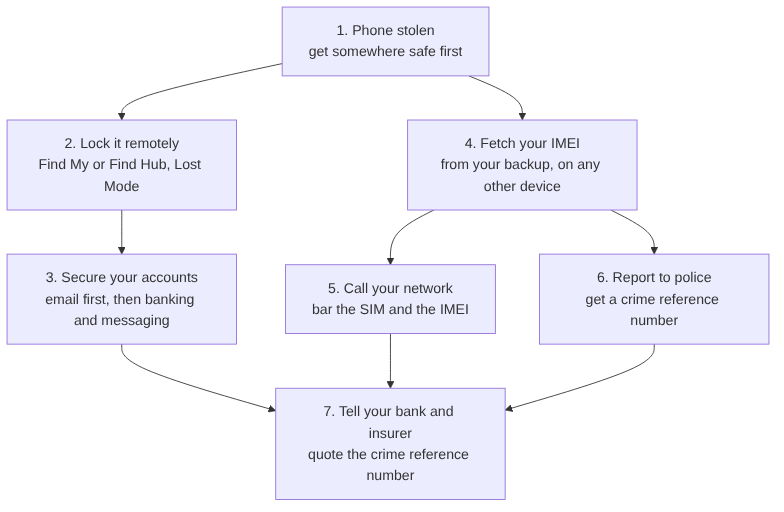
- Get somewhere safe first. If it was a snatch, the thief may still be close. Your safety matters more than the handset.
- Lock it remotely. From any other device, use Find My or Find Hub to put the phone into lost mode, lock it, or erase it. If a thief has your phone while it’s unlocked, speed matters here.
- Secure your accounts, starting with email. Your email can reset almost everything else, so change that password first. Then secure your banking, then your messaging apps. If your phone is also your authenticator, now is when you’ll be glad of those backup codes.
- Fetch your IMEI from your backup. This is the step you prepared for. Use a borrowed phone, a library computer or an internet café.
- Call your network. Ask them to bar the SIM and the IMEI. Give them the number from your card. The block is reported to be shared across the UK networks, so the phone should stop working on them, not just on yours.
- Report it to the police. Call 101 or use your force’s online form, and give them the IMEI. Ask for a crime reference number, which you’ll need later.
- Tell your bank and your insurer. Give them the crime reference number. Some insurers expect you to report quickly, so don’t leave it until next week.
You’ll notice that the IMEI feeds into steps 5 and 6 only, but those are the two where it matters most.
What blocking can and can’t do
I’d be doing you a disservice if I made this sound like a guaranteed fix, so here’s the honest picture.
- Blocking in the UK makes a phone much harder to use here. It does not necessarily stop it working abroad, because networks overseas may not honour a UK block. Reports of stolen UK phones being sent abroad are common.
- It doesn’t get your phone back. Recovery rates for stolen phones have historically been low. The point of blocking is to remove the reason to steal it.
- It doesn’t protect your accounts. That’s what steps 2 and 3 are for, and why they come first.
What it does do is make your phone a poor target, and it gives the police something concrete to work with. Both are worth ten minutes of preparation.
Ten minutes, starting today
If you only do one thing after reading this, do this:
- Dial
*#06#and write down every number that appears. - Note your serial number and your network’s lost and stolen number.
- Save one copy online, in a place you can sign into without your phone.
- Put one copy on paper at home, not in your bag.
- Switch on Find My or Find Hub, and print your backup sign-in codes.
Then forget about it, and hope you never need to look at it again.
Sources: Metropolitan Police, “Look Up, Look Out” campaign guidance on IMEI numbers; Vodafone UK, “Look up, look out: beat smartphone thieves”; Currys, “What to do if your phone is lost or stolen”. Check your own network’s guidance for current lost and stolen procedures.