The C4 Model and Structurizr: Containers
One box becomes four — and architecture gradually hands off to engineering from here

Last time we wrote the model for a boat hire service in Structurizr’s DSL: one system, two people, one external dependency, and a systemContext view to show it. This time we amend that same model — we don’t start a new one — to describe what’s inside the box.
Problem for the week, recap
A member of the public fills in a form to hire a boat for the day. The form checks their details against an external eligibility service. Later, harbour staff check the boat back in and record any damage.
Containers: the bits that get deployed
In C4 terms, a container is something that has to be separately run and separately deployed — a web application, a database, a queue, a mobile app, a batch job. It is not a Docker container specifically, though the name is an unfortunate coincidence that trips people up every time; think of it as “a unit of deployment” instead.
In the Structurizr DSL, a container is declared inside its parent softwareSystem block — which is exactly where last post left a comment reading // containers go here. Here’s the amendment:
        boathire = softwareSystem "Boat Hire Service" "Takes hire bookings, checks eligibility, and records the boat's condition on return" {
            webapp = container "Web Application" "Presents the hire form to the public, a return screen and a damage report screen to staff" "e.g. Node/Express"

            queue = container "Write Queue" "Buffers submitted hire forms before they're persisted" "e.g. a message queue" {
                tags "Queue"
            }

            processor = container "Hire Processor" "Consumes submitted hire forms from the queue and persists them" "e.g. a background worker"

            db = container "Database" "Stores hires, eligibility results, and check-in/damage records" "e.g. PostgreSQL" {
                tags "Database"
            }
        }
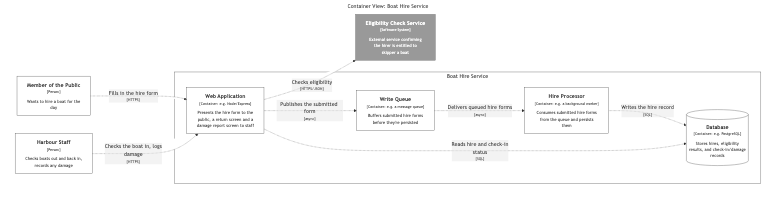
Four containers, each with a name, a one-line responsibility, and a loose technology hint. The tags on the queue and the database aren’t decoration — they’re what the styles block hooks into later to draw a pipe shape for one and a cylinder for the other, which the exported diagram picks up automatically.
            element "Queue" {
                shape pipe
            }
            element "Database" {
                shape cylinder
            }
Those two blocks go inside the existing styles block from last time, next to the Person and External entries.
The relationships change too — they now point at containers instead of the system as a whole, and there are new ones between containers:
        hirer -> webapp "Fills in the hire form" "HTTPS"
        staff -> webapp "Checks the boat in, logs damage" "HTTPS"
        webapp -> eligibility "Checks eligibility" "HTTPS/JSON"
        webapp -> queue "Publishes the submitted form" "async"
        queue -> processor "Delivers queued hire forms" "async"
        processor -> db "Writes the hire record" "SQL"
        webapp -> db "Reads hire and check-in status" "SQL"
Why a queue needs a processor — and when you’d actually want one
It would be entirely reasonable to have the web application write straight to the database and skip the queue and the processor entirely. For a lot of systems, that’s not just acceptable, it’s the right call: a direct write is one container instead of three, one thing that can fail instead of three, and one thing to operate instead of three. Don’t add a queue until you have a specific reason to. “It feels more scalable” isn’t a reason; it’s a guess.
The reasons that are worth it tend to be concrete:
- The user shouldn’t have to wait for the slow part. If persisting a hire involves work that can take a visibly long time — a slow write, a downstream notification, anything that isn’t instant — queuing it means the person who filled in the form gets their confirmation straight away, and the slow part happens after.
- The database shouldn’t see every spike directly. If hire forms can arrive in a burst — a peak morning, a promotion, a bank holiday — a queue absorbs the burst and the processor drains it at a steady rate, instead of the database taking the full spike on the chin.
- The write path needs to survive the database being briefly unavailable. With a direct write, a database blip is a failed request the user sees. With a queue in front of it, the same blip is a processor that’s briefly behind, and nobody outside the system notices.
If none of those apply — if the write is fast, the traffic is steady, and a database hiccup failing a request is an acceptable, rare inconvenience — a direct write is simpler, and simpler is usually better. For the boat hire service specifically I’m choosing to add one, because it’s a good example to build the Component and Code posts around, not because the traffic genuinely demands it. Say that out loud when you do it for a real system too: “I’m adding this because X is a real, current problem,” not “I’m adding this because queues are what scalable systems have.”
The detail worth being precise about once you do add one is that a queue is not a database. It stores and delivers messages; it doesn’t execute anything against them. Something has to be subscribed on the other end, reading each message off the queue and performing the actual write — that’s the Hire Processor. Leave it out and webapp -> queue -> db looks like a sensible pipeline, right up until you notice nothing in the model ever reads from the queue. It’s a small container, and an easy one to leave off a first sketch, but the model is wrong without it — not just the picture of it.
That’s a small thing worth noticing about modelling in the DSL rather than drawing a diagram directly: because the relationships are text, webapp -> queue and queue -> db sitting next to each other is unremarkable, nothing underlines it for you. The error doesn’t jump out visually the way it would if you’d drawn an arrow straight from a pipe shape into a cylinder and had to ask yourself what that arrow is supposed to mean. Modelling in text doesn’t eliminate that kind of mistake — only careful review does.
Declaring the container view
The views block gets a second entry:
        container boathire "c4-containers" {
            include *
            autoLayout
        }
Same pattern as the Context view: name the scope (boathire, the system, rather than a person or another container), include everything, let Structurizr lay it out. Running structurizr export -format mermaid again regenerates both views from the one model — the Context Mermaid file doesn’t change, because nothing in its scope changed; the Containers one is new.
And rendered:
Keeping the Makefile honest as the model grows
Last post I showed the Makefile rule that turns boat-hire-service.dsl into Mermaid. It’s worth being precise about what actually changed in the Makefile between that post and this one: nothing. The rule doesn’t know or care that the model now has four containers instead of zero — it just reruns structurizr export whenever the .dsl file’s timestamp is newer than the stamp file, and writes out whatever views the views block currently declares. That’s rather the point: the Makefile amends itself by not needing to be amended.
What is worth showing is the other half of the dependency chain — the part that says which Mermaid files actually come out of that export:
STRUCTURIZR_MERMAID := $(addprefix $(STRUCTURIZR_OUT)/,structurizr-c4-context.mmd structurizr-c4-containers.mmd structurizr-c4-components-webapp.mmd structurizr-c4-components-database.mmd)

$(STRUCTURIZR_MERMAID): $(STRUCTURIZR_STAMP)
Every Mermaid file this series produces is listed there, and every one of them depends on the stamp file rather than carrying its own export recipe — because there’s only one export command, and it produces all of them together. When I added the Container view this post, I didn’t touch this list at all; it was already there from planning out the whole series up front. If I’d been building this incrementally for a real project, this is the one line I’d come back to and extend each time a new view got declared.
There’s also a second, optional export worth knowing about now that there’s enough in the model to make it interesting. Mermaid gives us one static picture per view. Structurizr can also export the entire workspace as a small, self-contained interactive website — every view, in one place, pannable and zoomable in a browser:
structurizr-site: $(STRUCTURIZR_WORKSPACE) | structurizr-deps
	@which dot > /dev/null || (echo "Graphviz's 'dot' is required for the static HTML export — install it with your package manager (e.g. 'brew install graphviz' or 'apt install graphviz') and try again." && exit 1)
	$(STRUCTURIZR_CLI) export -workspace $(STRUCTURIZR_WORKSPACE) -format static -output $(STRUCTURIZR_SITE_DIR)
make structurizr-site produces an index.html plus its own CSS and JS — a few megabytes, not a single lightweight file — which is exactly the kind of thing that belongs embedded as an iframe in internal documentation rather than pasted into a Medium post. It has one dependency the Mermaid path doesn’t: Graphviz’s dot, for laying the diagrams out. I’ve deliberately not had structurizr-deps auto-install that the way it does structurizr-cli itself — Graphviz is a proper package-manager install (brew, apt, etc.), not a single portable binary, so the Makefile checks for it and tells you how to fix it rather than guessing at your platform. It isn’t wired into make build, because it’s an optional, heavier artifact with a dependency most contributors won’t already have — you reach for it deliberately, with make structurizr-site, when you want the interactive version rather than the static one.
Adding technology choices
Notice each container in the model carries a technology string as its last argument — "e.g. Node/Express", "e.g. PostgreSQL", "e.g. a message queue". That’s deliberately vague for this series, because the architecture doesn’t depend on which message broker or which relational database you pick. In a real model for a real system, you’d be specific: this is the level where “Node/Express” becomes “Node 22 / Express 5,” because at this zoom level those choices start to matter to the people reading the diagram — the engineers who’ll actually build and run the thing. Structurizr renders whatever string you put there; it doesn’t validate it against anything, so precision here is entirely on you.
That’s also roughly where an architect’s day-to-day attention naturally starts to thin out, in most organisations I’ve worked in — not a cliff edge where responsibility stops dead, more a gradual handoff. The Context and Container levels are where an architect is usually most involved: who talks to whom, what gets deployed, what technology family each piece belongs to. Moving into the Component level, and further still into the Code level, the balance shifts — the engineers building each container start carrying more of the detail, and the architect’s role shifts from deciding to reviewing, then from reviewing to trusting. That’s not a hard rule, and plenty of architects stay hands-on well below container level by choice, often because they’re also the engineer doing the building. But it’s a useful way to think about where attention naturally redistributes as you zoom in, rather than a line nobody on either side is meant to cross.
One repo or many?
A container is a unit of deployment, which makes “where does its code live” a real question the Container diagram tends to surface, even though it has no formal way to draw the answer. For the boat hire service, there’s a decision hiding behind those four boxes: does the Web Application, the Write Queue’s publishing code, the Hire Processor and the Database’s migrations all live in one repository, or four?
Both are defensible, and the right answer depends on things this diagram doesn’t show — team size, deployment cadence, how independently each container actually changes:
- One repository for the whole system (a monorepo) keeps the Web Application and the Hire Processor atomically versioned together — a single commit can change the message format both sides agree on, and nothing can merge if the two halves disagree. It’s the simpler starting point for a small team, which is most teams. It’s also not just a small-team pattern: Google runs practically its entire codebase as one monorepo, billions of lines across thousands of engineers, so the approach scales a very long way given enough investment in the tooling around it — custom build systems, code search, and ownership rules that make “everyone can see everything” tractable rather than overwhelming.
- One repository per container gives each container its own release cadence, its own CI pipeline, its own access control — genuinely useful once different containers are owned by different teams, deployed at different frequencies, or built in different languages. It costs you cross-container atomicity: a breaking change to the message format needs two coordinated releases instead of one commit.
Either way, there’s a case for a fifth repository that isn’t a container at all: a central documentation repository holding the architecture model — this boat-hire-service.dsl, or the Structurizr equivalent for a real system — separate from any of the containers it describes. A model that lived inside the Web Application’s repository would be easy for the Hire Processor’s team to forget existed; a model with its own home, that every team’s documentation links back to, has a better chance of staying the thing people actually check before making a change.
The counter-argument is just as real, though. Splitting containers into separate repositories already draws a line around who owns what, and keeping each container’s share of the documentation inside that same repository keeps it exactly where the people most likely to change it will actually see it — reviewed in the same pull requests as the code it describes, rather than a second place someone has to remember exists. The Hire Processor’s own README, sitting next to the Hire Processor’s own code, stands a better chance of staying accurate than a paragraph buried in a model several repositories away — and it’s still perfectly readable by another team, or by the architect coordinating across all of them, since nothing stops anyone opening a repository they don’t own.
Which way to go depends on which failure you’re more worried about. A central repository solves “documentation nobody can find,” at some risk of “documentation nobody who actually touches the code feels responsible for.” Documentation kept with each container solves the ownership problem, at some risk of a reader having to hunt across repositories to see the whole picture. This blog keeps the model alongside the posts about it for narrative reasons, but for an actual organisation, “where does the architecture model live” is worth answering as deliberately as “where does each container’s code live.”
One model, every view, consistently
This is the point in the series where the “one model, many views” pitch starts paying for itself. The Context view and the Container view share three elements — hirer, staff, eligibility — and in a hand-drawn pair of diagrams, keeping their names, descriptions and styling consistent across two separate pictures is a discipline you have to maintain yourself. Here, there’s only one declaration of each, referenced by both views. If I rename eligibility or change its description, both diagrams pick up the change the next time I export, because both are reading the same two lines of the model.
Where this is going
Next time, we go one level further in: inside the Web Application container are a handful of components — a form controller, an eligibility client, a queue publisher — and inside the Database are the tables they read and write. That’s the Component level, and it’s where Structurizr’s rule that one view shows one container’s internals starts to matter.
This post was first published on Medium on 20 October 2026.