The C4 Model and Structurizr: Components
Opening the Web Application box, and the Database’s too — in two diagrams, not one

Two posts in, our model has grown from “what is this system” (Context) to “what gets deployed” (Containers). Now we amend it again to describe what’s inside two of those containers.
Problem for the week, recap
A member of the public fills in a form to hire a boat for the day. The form checks their details against an external eligibility service. Harbour staff later check the boat back in and record any damage. The model now has four containers: a Web Application, a Write Queue, a Hire Processor that consumes it, and a Database.
Components: the bits inside the container
A component is declared inside its parent container block, the same nesting pattern as containers-inside-systems from last time. For the Web Application:
            webapp = container "Web Application" "Presents the hire form to the public, a return screen and a damage report screen to staff" "e.g. Node/Express" {
                formController = component "Hire Form Controller" "Handles form submission and validation"
                returnController = component "Return Controller" "Handles staff check-in, recording who completed the return"
                damageController = component "Damage Controller" "Records damage to a boat, independent of any particular hire"
                eligibilityClient = component "Eligibility Client" "Calls the external eligibility service"
                queuePublisher = component "Queue Publisher" "Publishes validated hire requests to the write queue"
                hireRepository = component "Hire Repository" "Reads and writes hire, return and damage data"
            }
Splitting check-in into a Return Controller and a separate Damage Controller is a deliberate choice, not just two names for one thing: a boat can pick up damage without being mid-hire at all — a dockside inspection, say — so staff need a way to log it that doesn’t require a return to be happening. Keeping the two controllers distinct in the model now saves a confusing rename later, once the schema in the next post shows why they can’t share a table either.
The Database gets the same treatment too — not as code, since a database doesn’t have components in the software sense, but as the tables that make it up. Structurizr doesn’t care what a “component” represents; it’s just a named, described element one level inside a container, so nothing stops you modelling a table, or a view built on top of one, as a component:
            db = container "Database" "Stores hires, eligibility results, and check-in/damage records" "e.g. PostgreSQL" {
                tags "Database"
                hiresTable = component "Hires Table" "One row per submitted hire"
                boatsTable = component "Boats Table" "The fleet of boats, including hireable status"
                damageTable = component "Damage Reports Table" "Condition notes logged at check-in"
                activeHiresView = component "Active Hires View" "Hires that haven't been checked in yet"
                unresolvedDamageView = component "Unresolved Damage Reports View" "Damage reports that haven't been actioned yet"
            }
The two views earn their place in the model for the same reason the tables do: harbour staff ask “which boats are still out” and “what damage hasn’t been dealt with yet” often enough that they deserve a name here, even though what’s actually behind each one — the join, the filter — is Code-level detail the Components view has no business showing.
New relationships connect the components to each other, to the two people, to the external eligibility service, and to the write queue:
        hirer -> formController "Submits hire form" "HTTPS"
        staff -> returnController "Checks the boat in" "HTTPS"
        staff -> damageController "Logs damage to a boat" "HTTPS"
        formController -> eligibilityClient "Validates eligibility"
        eligibilityClient -> eligibility "Checks eligibility" "HTTPS/JSON"
        formController -> queuePublisher "Hands off validated request"
        queuePublisher -> queue "Publishes" "async"
        returnController -> hireRepository "Records the return"
        damageController -> hireRepository "Records damage"
        hireRepository -> hiresTable "Reads/writes" "SQL"
        hireRepository -> boatsTable "Reads" "SQL"
        hireRepository -> damageTable "Writes" "SQL"
        activeHiresView -> hiresTable "Reads (hires with no completed return)" "SQL"
        unresolvedDamageView -> damageTable "Reads (damage not yet actioned)" "SQL"
Two views, declared the same way as every other
Adding a Component view to the views block follows the exact pattern Context and Containers already set — name the scope, include everything, let Structurizr lay it out. The only difference this time is that it takes two blocks, one per container:
        component webapp "c4-components-webapp" {
            include *
            autoLayout
        }

        component db "c4-components-database" {
            include *
            autoLayout
        }
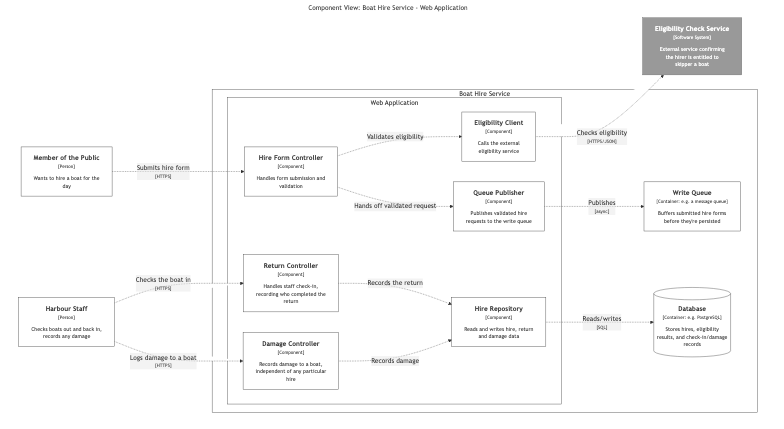
Exporting produces two Mermaid files and two PNGs. Here’s the Web Application:
And here’s the Database, with its tables and views drawn as components:
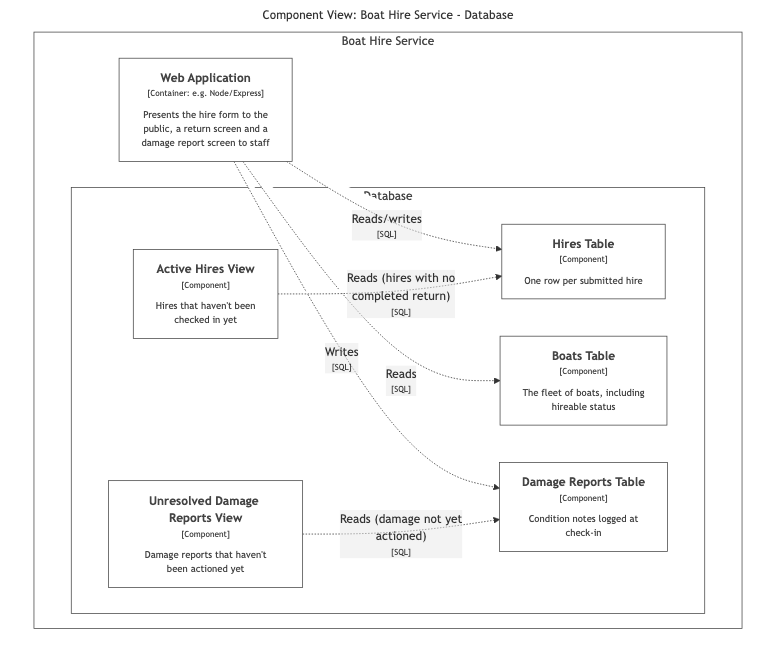
Look at the second diagram for a moment. The relationship hireRepository -> hiresTable was declared between two components, but Hire Repository lives inside the Web Application, which this view doesn’t expand — so Structurizr draws it as the Web Application container reading and writing the tables directly, rolling the relationship up to the nearest element the view actually shows rather than silently dropping it. That’s the model keeping itself honest: the picture reflects exactly what’s declared, at whatever level of detail this particular view has chosen to show.
Two views instead of one is also simply the correct answer here, not a workaround. “The components inside this container” has one container as its subject; it’s a well-defined question, and Structurizr’s component view answers exactly that question, scoped to exactly one container at a time. Two containers’ worth of components, side by side, is two separate questions with two separate answers — which is exactly what the two diagrams above give you.
Right vs good
The Container view was about whether the system does the right thing — does it talk to the eligibility service, does it have somewhere to persist a hire, does the shape of the deployment make sense. The Component view is where the focus shifts to whether a container does the thing right: is validation separated from persistence, does the controller know anything about SQL, is there one obvious place responsible for calling the eligibility service rather than three places that each do it slightly differently.
Look again at the Web Application diagram: only the Return Controller and the Damage Controller talk to the database, and even then only through the Hire Repository — never directly. The Hire Form Controller doesn’t touch the database at all from inside this container; once a submission passes eligibility, it hands off to the Queue Publisher and its job is done. The actual write for a new hire happens downstream, in the Hire Processor container we added last time, consuming the queue — a separate deployable unit, with its own components, that neither of these two diagrams draws because it’s out of scope for “what’s inside the Web Application” and “what’s inside the Database.”
That split is worth being honest about rather than glossing over: it means swapping PostgreSQL for something else touches two places, not one — the Hire Repository here, and whatever the Hire Processor uses on its side. What the diagram does make visible is that within the Web Application, there’s exactly one component responsible for talking to the database, which is still real internal discipline. A Context or Container view has no vocabulary to express that at all; it only shows up once you’re modelling components.
Where this is going
One level left, and it’s the one Structurizr deliberately leaves to other tools. Next time we go inside the Hire Form Controller, the Return Controller and the Damage Controller — the code behind each call into the core of the Web Application — and look at the actual schema behind the Database’s tables and views. That’s the Code level, and it’s where class diagrams and an entity-relationship diagram take over from the DSL.
This post was first published on Medium on 21 October 2026.