The C4 Model and Structurizr: Code
The last zoom level — and the one where Mermaid draws the picture on its own

We’ve gone from the whole system (Context), to what gets deployed (Containers), to what’s inside the Web Application and the Database (Components) — all three generated from one Structurizr model, exported to Mermaid, and rendered through this blog’s existing pipeline. This post is the fourth and final level: Code. Structurizr’s DSL sits this one out — its model stops at components — and two purpose-built notations already do this job better than an architecture DSL would: a class diagram for the Web Application’s code, and an entity-relationship diagram for the Database’s schema.
Problem for the week, recap
A member of the public fills in a form to hire a boat. The Hire Form Controller validates it, checks eligibility with an external service, and — once accepted — hands it to the Write Queue; the Hire Processor, a separate container, does the actual persisting. Later, the Return Controller records who brought the boat back, and the Damage Controller logs condition notes against a boat. The Database stores all of it. This post looks inside both sides: the code behind the three controllers, and the schema behind the tables.
The Web Application’s code: hexagonal architecture
This is the least prescriptive of the four levels, and deliberately so: C4 doesn’t invent its own notation for code, because your language and your IDE already have perfectly good ones — UML class diagrams, entity-relationship diagrams, whatever your tools produce. The point of the Code diagram isn’t a new notation; it’s zooming in one level further than Components, into a single component, to show how its classes or interfaces actually fit together.
For the Hire Form Controller, I want to show something specific: hexagonal architecture — also called ports and adapters. The idea is that the core business logic (deciding whether a hire can go ahead) shouldn’t know or care whether eligibility is checked over HTTP, or whether “publishing to the queue” means SQS or RabbitMQ. Those are all details on the outside. Note what the core of this flow does not hold: a database port. Persisting the hire is the Hire Processor’s job, in another container, so the Web Application’s side of this flow stops at the queue. The core only knows about ports — interfaces it depends on or is called through — and something else, an adapter, provides the real implementation.
classDiagram
    direction LR

    class HireBoatUseCase {
        <<interface>>
        +hireBoat(request) HireResult
    }
    class BoatHireService {
        +hireBoat(request) HireResult
    }
    class EligibilityPort {
        <<interface>>
        +checkEligibility(hirer) bool
    }
    class QueuePublisherPort {
        <<interface>>
        +publish(hire)
    }

    class HireFormController {
        +submit(formData)
    }
    class EligibilityHttpAdapter
    class QueueMessagePublisher

    HireFormController ..> HireBoatUseCase : calls
    BoatHireService ..|> HireBoatUseCase : implements
    BoatHireService ..> EligibilityPort : uses
    BoatHireService ..> QueuePublisherPort : uses
    EligibilityHttpAdapter ..|> EligibilityPort : implements
    QueueMessagePublisher ..|> QueuePublisherPort : implements
And rendered:
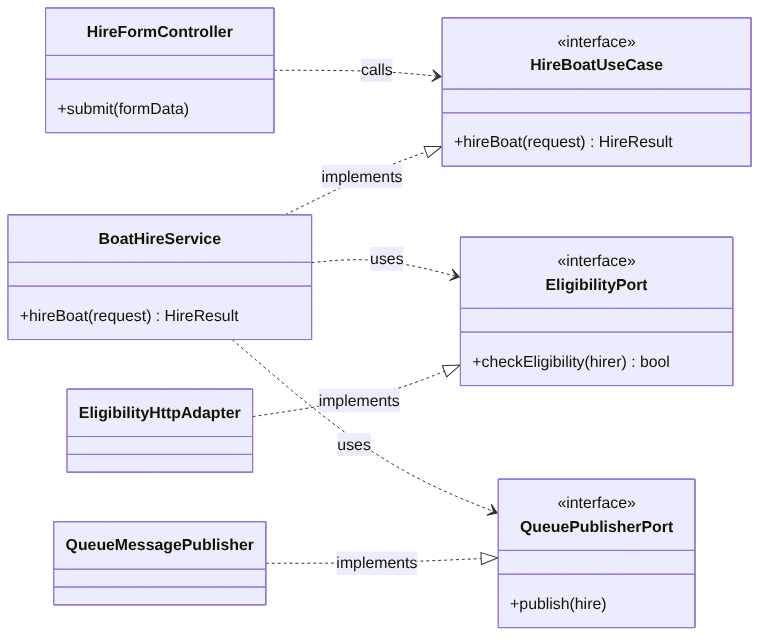
Read the arrows by their label, not just their direction. HireFormController calls HireBoatUseCase — it depends on the interface, not on BoatHireService directly. BoatHireService implements that same interface, and separately uses two outbound ports — EligibilityPort and QueuePublisherPort — without knowing which concrete class is on the other end of either. The two adapters on the left each implement exactly one of those ports, and that’s the only thing they do: translate between the core’s abstract port and a specific technology.
This is a small example, so the benefit is easy to understate. Imagine testing BoatHireService without this structure: you’d need a real HTTP call to the eligibility service and a real queue, or an elaborate mocking setup bolted onto code that was never written with substitution in mind. With the ports in place, a test can hand BoatHireService a fake EligibilityPort that always returns true, and a fake QueuePublisherPort that just records what it was called with. The business logic — the actual rule about whether a hire can go ahead — gets tested in complete isolation from every external system it depends on. It also means the technology decisions from the Container diagram, two levels up, can change without touching the core at all: swap one message broker for another, write a new class that implements QueuePublisherPort, delete QueueMessagePublisher, done.
It’s worth saying plainly that most components don’t need this much structure, and C4 doesn’t ask for a Code diagram of every one of them. My own rule of thumb, and I’d say the sensible reading of C4 treating this level as optional, is to draw it only for the components that are architecturally significant or likely to confuse someone — not as a blanket exercise across the whole codebase. A small CRUD controller with no interesting logic doesn’t need a ports-and-adapters diagram; it needs maybe a paragraph, if that. Reach for this level when a component’s internal structure is doing real work that isn’t obvious from its name and its one-line description in the Component diagram.
The same pattern, for the Return Controller and the Damage Controller
The Components post added two more components to the Web Application alongside the Hire Form Controller: a Return Controller and a Damage Controller, each handling its own HTTP endpoint. They follow the same shape — an inbound port each (RecordReturnUseCase, RecordDamageUseCase), a service implementing it (ReturnService, DamageService) — but unlike the Hire Form flow, both write to the database directly, which is why the Components post gave only these two a route to the Hire Repository. Both depend on the same HireRepositoryPort. I’ve drawn that as a second diagram rather than cramming every class into one picture:
classDiagram
    direction LR

    class RecordReturnUseCase {
        <<interface>>
        +recordReturn(hireId, returnedBy)
    }
    class RecordDamageUseCase {
        <<interface>>
        +recordDamage(boatId, notes)
    }
    class ReturnService {
        +recordReturn(hireId, returnedBy)
    }
    class DamageService {
        +recordDamage(boatId, notes)
    }
    class HireRepositoryPort {
        <<interface>>
        +findByBoat(boatId) Hire
        +recordReturn(hireId, returnedBy)
        +recordDamage(boatId, notes)
    }

    class ReturnController {
        +submit(hireId, returnedBy)
    }
    class DamageController {
        +submit(boatId, notes)
    }
    class PostgresHireRepository

    ReturnController ..> RecordReturnUseCase : calls
    DamageController ..> RecordDamageUseCase : calls
    ReturnService ..|> RecordReturnUseCase : implements
    DamageService ..|> RecordDamageUseCase : implements
    ReturnService ..> HireRepositoryPort : uses
    DamageService ..> HireRepositoryPort : uses
    PostgresHireRepository ..|> HireRepositoryPort : implements
And rendered:
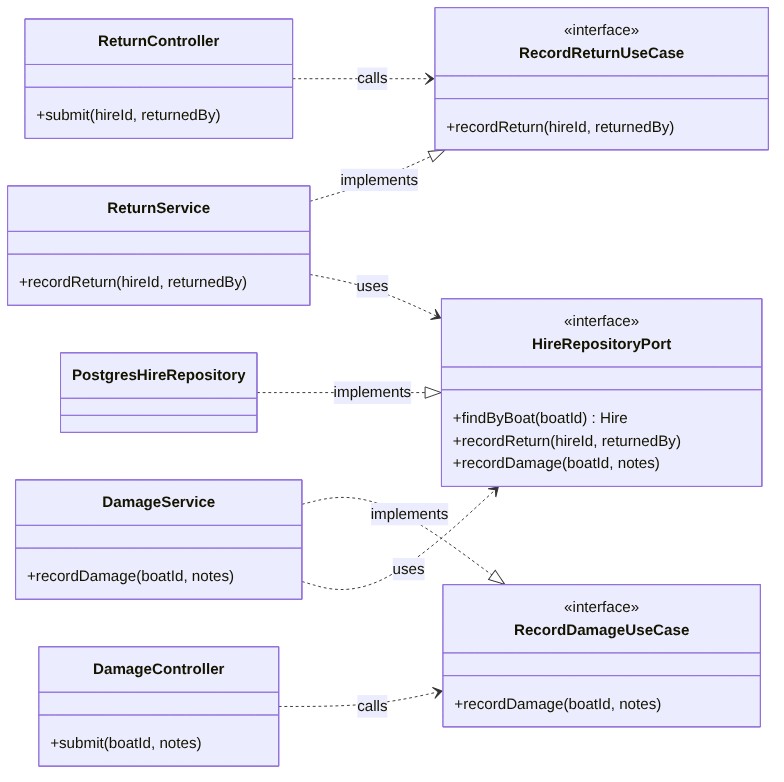
Notice HireRepositoryPort carries recordReturn and recordDamage alongside findByBoat, which the Web Application uses to read hire and check-in status. There is no save(hire) on it: a new hire is written by the Hire Processor, which sits outside both of these diagrams, so the Web Application’s database port only ever records returns and damage and reads status back. One port, one adapter (PostgresHireRepository), two services calling into it. That’s the discipline the Components post established — within the Web Application, one place touches the database — carried all the way down to the method signatures.
The Database’s code: the actual schema
The Component post drew the Database as three boxes — Hires Table, Boats Table, Damage Reports Table — each with a one-line description. That’s the right amount of detail for a Component view: it tells you the tables exist and roughly what each is for, and nothing about columns or types, because that’s not the question a Component diagram is answering. The Code level is where that question finally gets asked, and for a database, the notation that answers it isn’t a class diagram — it’s an entity-relationship diagram.
erDiagram
    %% a hire joins one boat to one hirer, for one date — HIRES is a join table, not an entity in its own right
    BOATS ||--o{ HIRES : "is hired in"
    HIRERS ||--o{ HIRES : "makes"
    %% returning is its own event, with its own attribution — not a status flip on the hire
    HIRES ||--o| RETURN_REPORTS : "is completed by"
    %% damage belongs to the boat, not the hire, so it can be logged with no hire in progress at all
    BOATS ||--o{ DAMAGE_REPORTS : "has"

    BOATS {
        int id PK
        string name
        string type
        bool hireable
    }
    HIRERS {
        int id PK
        string name
        string email
        string phone
    }
    HIRES {
        int id PK
        int boat_id FK
        int hirer_id FK
        date hire_date
        datetime eligibility_confirmed_at
        string status
    }
    RETURN_REPORTS {
        int id PK
        int hire_id FK
        string returned_by
        datetime returned_at
    }
    DAMAGE_REPORTS {
        int id PK
        int boat_id FK
        string notes
        datetime logged_at
    }
And rendered:
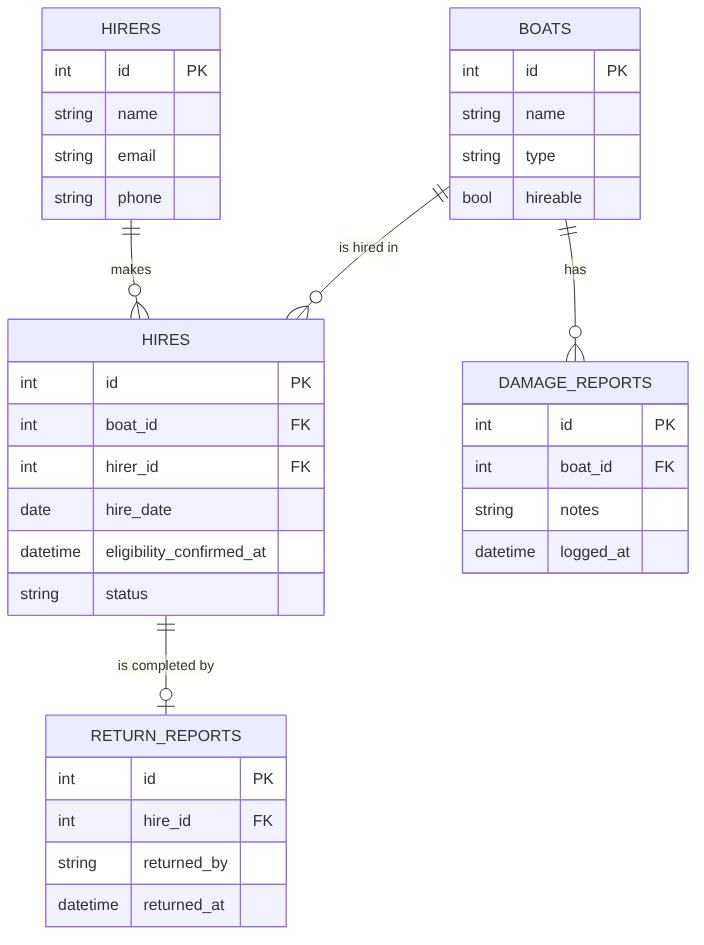
The comments in the source carry most of the “why” here, which is where this kind of detail belongs — next to the column it explains, not in a paragraph the reader has to hold in their head while scanning the boxes. One addition worth calling out in prose: HIRES is a join table, not a container for the hirer’s own details, and its eligibility_confirmed_at timestamp is the stored form of the “eligibility results” the Container diagram promised: only requests that passed the check ever reach the queue, so a pass/fail flag would always read “pass”, while a time at least records when. A single hirer name on the hire record would do as a placeholder, but a real hirer has a name, an email, a phone number, and ideally a record that persists across more than one hire — which is exactly what pulling HIRERS out into its own table buys you, at the cost of one join.
This is also where “hireable status,” the wording the Boats Table carried since the Components post, turns into an actual column: hireable, a boolean on BOATS. And it’s where the Component diagram’s relationships — “reads/writes,” “reads,” “writes,” all grouped under one Hire Repository — turn out to be five tables doing more distinct jobs than three vaguely-named boxes could show. That’s not a contradiction of the Components post; it’s the Component view doing its job at the right altitude. Nobody reading it needed to know there’d turn out to be a separate table for returns, or that hirers would get their own table — they needed to know the Web Application talks to the database through one place, which is still true.
This is the kind of detail that genuinely doesn’t belong any higher up. Nobody reading the Container diagram needs to know there’s a hireable boolean; nobody reading the Component diagram needs the foreign key names, or to be told in advance exactly how many tables it’ll turn out to be. It only becomes useful once you’re the person writing the migration, or debugging why a damage report didn’t show up against the hire you expected it to, which is exactly the audience the Code level is for.
Two views on top of the schema
Two questions come up often enough in a harbour office that they’re worth answering as database views rather than ad hoc queries written fresh each time: which hires are still out, and which damage reports haven’t been dealt with yet. Both read from tables already on the diagram, which is exactly why they’re views and not new tables — there’s nothing here that isn’t derivable from HIRES, RETURN_REPORTS, and DAMAGE_REPORTS.
CREATE VIEW active_hires AS
SELECT hires.*
FROM hires
LEFT JOIN return_reports ON return_reports.hire_id = hires.id
WHERE return_reports.id IS NULL;

CREATE VIEW unresolved_damage_reports AS
SELECT *
FROM damage_reports
WHERE resolved_at IS NULL;
The second one assumes a resolved_at column on DAMAGE_REPORTS that isn’t in the diagram above — a deliberate simplification, because the diagram’s job was to show how hirers, boats, hires and returns relate, not to exhaustively model every column a real system would eventually need. These two views are exactly the kind of thing the Components-level model can still point at without drawing their SQL: a component named Active Hires View or Unresolved Damage Reports View, described in one line, sitting next to the tables they read from — detail that belongs at the Components level because “this view exists and roughly what it’s for” is useful to know from a distance, while the LEFT JOIN behind it is Code-level detail nobody needs until they’re the one maintaining it.
One more thing worth saying about a design document
Everything in this series — the DSL, the class diagrams, this schema — is a design, not an instruction manual. An engineer implementing the Return Controller or writing the migration for HIRERS is expected to bring their own judgement to it, and will very likely change things once they’re actually writing the code: a column renamed, a check moved earlier, a table split that looked fine on a diagram and awkward in a query planner. That’s not the design failing — a diagram that survived contact with implementation completely unchanged would be more surprising than one that didn’t. The value of drawing it first isn’t that it’s binding; it’s that disagreements and gaps show up on a whiteboard, in a pull request against a .dsl file, before they show up as a production incident.
Two notations, each better at its job than a generic one would be
Structurizr stops at Components. It models people, software systems, containers and components — architecture-shaped things — and it doesn’t try to also be a UML tool or a database modelling tool, because being good at both of those is a different, harder problem than being good at architecture diagrams, and the overlap isn’t worth the compromise. That’s a sensible place to draw the line: a class diagram and an entity-relationship diagram are mature, widely understood notations that already do exactly these two jobs, and Structurizr inventing a weaker version of either inside its own DSL would make the series worse, not better.
So none of the three diagrams in this post are exported from the model. All three are hand-written Mermaid — two classDiagrams for the Web Application’s code, one erDiagram for the Database’s schema — the first hand-authored diagrams in the series. All three render through exactly the same Makefile rule as the exported ones, because as far as mmdc is concerned a .mmd file is a .mmd file regardless of where it came from. What’s different is that there’s no model behind these three keeping them honest the way the DSL did for the first three posts — which is exactly why it’s worth reaching for this level selectively, for the handful of components where the extra detail earns its place, rather than as a diagram you draw for everything out of habit.
What I ran
I ran all the code in this series before writing it up, with one DSL file per post, each being the model as it stands at the end of that post. Running it all needs Java 17 or later, Node, Python 3, curl and unzip, and Graphviz (the dot command, from brew install graphviz or apt install graphviz), which the interactive site export depends on; the Makefile downloads structurizr-cli and mermaid-cli itself. The run validates the DSL for each post, exports each to Mermaid and compares the result with the diagrams published on the blog, renders the three hand-written diagrams from this post, builds the schema and the two views from this post in a throwaway SQLite database and checks what they return, and finally checks that every code block in the four posts matches the file it came from. That last check is what caught several places where the earlier posts’ snippets had drifted from the model (the view keys, the relationship labels and the Makefile paths), and those are fixed.
The versions: structurizr-cli 2025.11.09 (structurizr-java 5.0.2) on OpenJDK 21.0.12, @mermaid-js/mermaid-cli 11.17.0 through headless Chromium, SQLite 3.45.1 through Python’s sqlite3. The Context export from the first post’s model is identical to the published file, and so are all four views exported from the final model. In the SQL check, active_hires returned only the outstanding hire and unresolved_damage_reports only the unresolved report. I haven’t run the SQL on PostgreSQL itself, though nothing in it is dialect-specific, and the interactive site from the second post builds with Graphviz 2.43.0 installed (about 3 MB, with an index.html at the top), as part of the same run.
Wrapping up the series
One model, amended three times in Structurizr’s DSL — people and systems, then containers, then components in two separate containers — generating four diagrams nobody had to draw by hand. Then, at the one level Structurizr deliberately leaves alone, three diagrams drawn by hand in notations built specifically for the job: two class diagrams for code, an entity-relationship diagram for a schema. Mermaid did the rendering on every diagram in this series, turning a .mmd file into a PNG via this blog’s existing Makefile rule every time — but for the first four, it was never the thing being authored. The DSL was, and Mermaid was simply the format Structurizr happened to export to that this blog’s pipeline already understood.
The thing worth taking away isn’t the boat hire example — it’s the discipline of maintaining one model and letting the views fall out of it, for as long as that’s the right tool, and switching deliberately to something purpose-built once it isn’t. C4 gives you four zoom levels; Structurizr commits fully to three of them and hands the fourth to tools that were built for exactly that job. Knowing which of those you’re in, before you reach for a diagram at all, is the main skill this whole series has been about.
This post was first published on Medium on 22 October 2026.