OWASP Top 10 for Vibe Coders, Part 1: Why This Series Exists
Not another post about whether you know what a dict is. This is about the stuff that actually gets people hurt — explained for people who got something real into production.
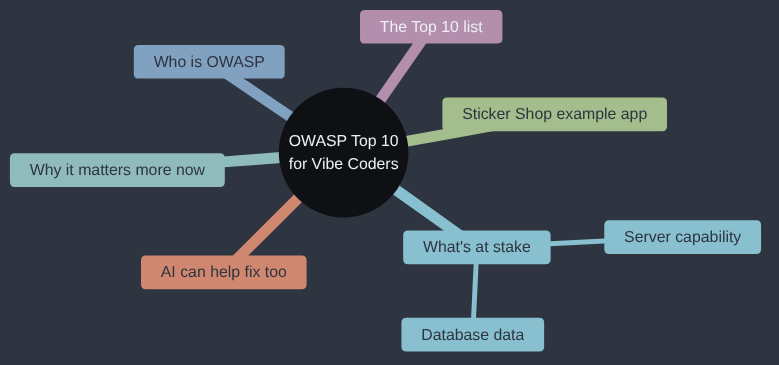
When I was a kid, I could open a surprising number of other kids’ bike locks. Not through any talent for lock-picking: the combination locks most of us had came from the same bike store, all set to the same standard code, and an awful lot of their owners never got round to changing it. Try the factory code and the lock usually opened. I’m not especially proud of that, but it taught me something I’ve seen a few times since in software: the lock was perfectly good, it was just still set up the way it left the shop. Much of what this series covers is the web app version of that bike lock.
If you ship fast but can’t always read what’s underneath, if you’re a few years into engineering and still take a framework’s word for it, or if you test how users behave without seeing how that lands in the code, this series is written for you.
Start here: well done
If you’ve shipped something — a side project, a tool for your team, a small business’s booking site — and real people are using it, you’ve done something most people who “learn to code” never do. You pushed through deployment, DNS, a broken build, probably a late night staring at an error message that meant nothing to you. That’s hard. It’s a properly hard job, and getting to “it works, in production, for strangers” is an achievement whichever way you got there — hand-typed, copied from a tutorial, or written with an AI pairing with you line by line.
This series is not going to tell you that you did it wrong because you don’t know what a decorator is, or because you asked an AI to write your login page instead of reading a 400-page textbook first. Nobody is grading your code style here. What this series is about is a much narrower, much more practical question: what are the ways a stranger on the internet can hurt your users, your business, or you — and how do you stop them?
That list has a name. It’s called the OWASP Top 10, and it’s been the closest thing the web has to a “most important things to not get wrong” list for over twenty years.
Who is OWASP, and why should you care what they think?
OWASP stands for the Open Worldwide Application Security Project. It’s a nonprofit, not a company trying to sell you something. It’s made up of thousands of volunteer security researchers, consultants, and engineers from all over the world, who between them see an enormous number of real break-ins — the kind that make the news, and the much larger number that don’t.
Every few years, OWASP pools what they’re seeing across the industry and publishes a Top 10: the ten categories of security problem that cause the most real-world damage, ranked roughly by how common and how serious they are. It isn’t a list of obscure, theoretical bugs that only apply to banks and governments. It’s built from actual breaches, actual stolen data, actual companies that had a very bad week. The 2025 edition — the one this series is built around — draws on data from dozens of organisations and hundreds of thousands of real applications that were tested.
Think of it like a list of “the ten ways this kind of building actually catches fire,” put together by people who’ve investigated thousands of fires. You don’t need to be a fire engineer to find it useful. You just need to own a building.
What’s actually at stake
Before any of the specifics, let’s be clear about what we’re actually trying to protect, because it’s narrower and more concrete than “security” in the abstract. Broadly speaking, there are two things on the line every time someone attacks a web app like Sticker Shop:
- The data sitting in the database. Names, email addresses, delivery addresses, order history, password hashes, maybe payment details. This is information real people handed over on trust, and once it’s copied by someone who shouldn’t have it, you can’t un-copy it.
- The server itself, and what it’s allowed to do. Your app’s server usually has real capabilities — it can send emails, talk to a payment provider, read and write files, reach other services on the internet. An attacker doesn’t always want your data; sometimes they want to borrow your server’s capabilities for their own purposes: sending spam that looks like it comes from a legitimate business, hosting content they don’t want traced to them, or using your server’s processing power for something of their own.
Every category in this series threatens one or both of those two things. Keeping that in mind makes it much easier to judge how serious any individual risk actually is for your app, and in which direction to protect it.
Why this matters more now, not less
Here’s the uncomfortable bit. Writing code with an AI assistant — “vibe coding” — makes it faster than ever to go from idea to live website. That’s great. It also means the gap between “I built something” and “I built something a thousand people can now reach” has gotten much, much shorter, without the gap in security knowledge shrinking at the same rate.
An AI assistant is very good at making code that works — that does the thing you asked for, in the way you described it. It is not automatically good at making code that resists someone trying to misuse it on purpose, because you didn’t ask for that, and “make it secure” wasn’t the brief. Nobody sat down and thought like an attacker. That’s not a flaw unique to AI-written code, either — it’s the same reason security problems have been showing up in hand-written code for thirty years. The AI just means more people are now shipping more code, faster, without necessarily having had the “and here’s how people break this” conversation yet.
This series is that conversation.
There is good news, though, and I’d rather say it plainly before anything else: the same AI assistant that helped you build the app is also quite good at helping you secure it, once you know to ask. Finding a missing permission check, spotting a hardcoded secret, explaining why a particular line is risky, even writing the fix — these are the kind of pattern-matching tasks AI coding assistants are strong at. The gap this series is closing isn’t a gap in what AI can do. It’s a gap in knowing which questions to ask it. Every article from here on ends with prompts built for exactly that.
The world we’ll be breaking into
To make all of this concrete rather than abstract, every article in this series uses the same example: a small Flask web app called Sticker Shop. It’s the kind of thing a solo vibe coder might actually build and launch: people can browse stickers, create an account, log in, place an order, and there’s a small admin area for the shop owner to manage stock and process refunds.
Here’s roughly how it’s put together:
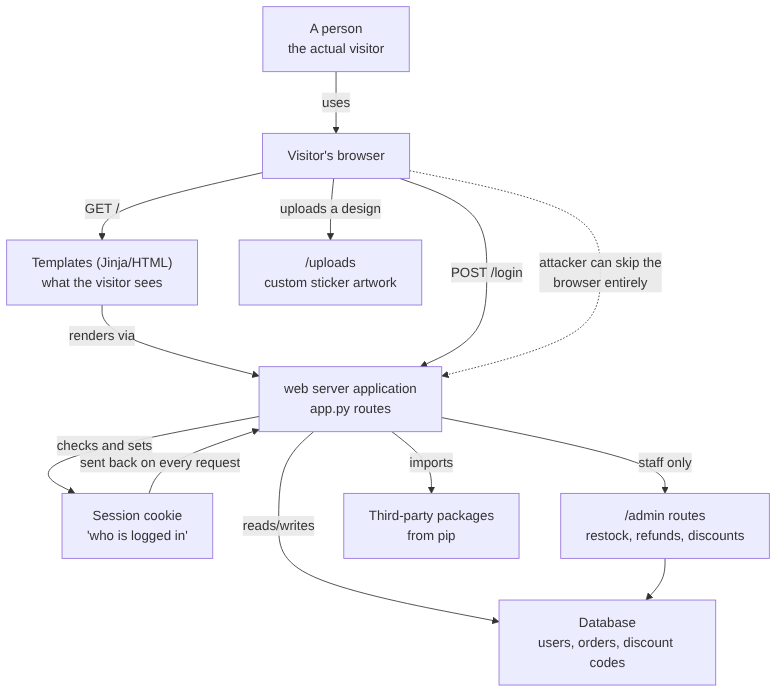
A few things in that picture matter for this whole series, so stay with it for a second:
- The browser is not the only way in. Your website’s JavaScript might stop someone clicking a button they shouldn’t. It does nothing to stop someone who skips the browser and talks to your Flask app directly. We’ll come back to this a lot — it’s the single most important idea in the whole series.
- The session cookie is the only thing saying “this is Alice.” Every request after login carries that cookie, and the app trusts it. If that trust is misplaced, everything downstream is too.
- The database doesn’t know the difference between a legitimate order and a malicious one. It just stores whatever the app tells it to store, and returns whatever the app asks it to return.
- Third-party packages run with the same permissions as your own code. Even if you’ve never typed a package-manager command yourself, something has — your AI assistant, when it scaffolded the project, or whoever’s tutorial you followed. Every modern language has this same mechanism under a different name (
pipfor Python,npmfor JavaScript,NuGetfor .NET,go getfor Go), and they all work the same way underneath: adding one line to a dependencies file pulls in someone else’s code and runs it as part of your app, trusted completely, whether you ever typed the install command or not. - The admin routes exist in the same app as everything else. Whatever separates “customer” from “shop owner” is a decision your code makes, not something that happens automatically.
Every one of those bullet points becomes its own article later in this series, with a full, runnable (but deliberately small — under 50 lines) Python script showing the attack in action, and a fix.
The OWASP Top 10: 2025 edition, in plain English
This is the whole list, with a one- or two-sentence plain-English translation of each. We’ll go through all ten, one at a time, but not in this order. The series groups them by where the danger comes from rather than by OWASP’s rank: first who’s asking (access control, cryptography, authentication), then what surrounds your code (misconfiguration, and where your secrets live), then what you hand the app (injection, design), then what you import or receive (supply chain, data integrity, and checksums), and finally what happens when something goes wrong (logging, and exceptional conditions).
- Broken Access Control. The app lets someone do something, or see something, that they shouldn’t be allowed to. Think: a customer who can view another customer’s order just by guessing a number in the address bar.
- Security Misconfiguration. The app itself might be fine, but something around it is left wide open — debug mode left on in production, a default password never changed, a settings file that shouldn’t be public sitting right where anyone can fetch it.
- Software Supply Chain Failures. The danger isn’t your code — it’s the code you imported. A compromised or disguised third-party package can do real damage, because it runs with all the trust your own code has.
- Cryptographic Failures. Sensitive information — passwords, card details, personal data — gets stored or sent in a way that isn’t properly protected, so if someone gets hold of it, it’s instantly readable.
- Injection. User input gets treated as instructions instead of data. The classic example is SQL injection, where typing the right characters into a search box can make the database do something you never intended.
- Insecure Design. Sometimes the code does exactly what it was designed to do — and the design itself has a hole in it. No amount of careful coding fixes a plan that was flawed from the start.
- Authentication Failures. Weaknesses in how the app checks “are you really who you say you are” — things like no limit on password guesses, or sessions that don’t properly end.
- Software or Data Integrity Failures. The app trusts something it shouldn’t — an update, a file, a piece of data — without checking it hasn’t been tampered with on the way.
- Security Logging and Alerting Failures. When something bad happens, nobody finds out. No record was kept, or nobody was watching the record that was.
- Mishandling of Exceptional Conditions. When something goes wrong — an error, a weird input, a system that doesn’t respond — the app’s reaction to that failure creates a new problem, sometimes a worse one than the original.
That’s the whole list. None of it requires you to be a cybersecurity expert to understand. Most of it comes down to one underlying habit: assume everyone using your app, including the ones who aren’t using the website at all, might be trying to misuse it — and check accordingly.
One more thing worth saying plainly: this is a top ten, not a top one hundred. It doesn’t claim to cover every attack that has ever existed or ever will. What it does cover, by design, is the handful of categories responsible for the large majority of real-world breaches — the common, well-understood, entirely preventable mistakes that account for most of the damage done across the whole industry, year after year. Work through this series and actually fix what it covers in your own app, and you won’t be unbreakable. Nothing is. But you’ll have closed the doors that get walked through every day, and what’s left standing between an attacker and your app will mostly be the kind of highly resourced, highly targeted effort that very few small apps ever actually face.
The view I’m writing from
Before the tour starts, you should know where I’m standing, because it colours every article that follows. My strong opinion about where security effort goes is this: inspect for what’s already wrong before you build anything for what might one day go wrong. Think of a boat before a season’s sailing. You walk round her and check the hull for holes, the rigging for chafe and the seacocks for anything that won’t close, and you do all of that before anyone so much as mentions fitting a dance floor on the foredeck. Plenty of security advice reaches for the dance floor first: a web application firewall, a zero-trust architecture, a penetration test you can’t yet afford. Most small apps that get broken into aren’t broken by anything that clever. They’re broken through a hole that was in the hull on launch day, and the ten categories in this series are, as far as I’m concerned, a very good list of where to look for those holes.
Two more opinions, while I’m being honest about my biases. Learn one framework properly, because the ideas carry across to every other framework even when the details don’t. My first web framework was Flask, which is why it’s the one this series uses, but the one I understand best is ASP.NET, and a good part of that is down to Microsoft’s documentation, whose style is a lesson in explaining things in its own right. And when a real problem shows up, fix it with the tool that was built for that problem rather than something you wrote at midnight; every fix in this series already exists, usually as a few lines in a library you have installed. Each article also says where its fix came from, because nearly every one of them exists because somebody, somewhere, sank first.
What this series will and won’t do
This series will not spend time on code style, naming conventions, or whether you should have used a class instead of a function. None of that is what gets people hacked. Every category article from here on will:
- Explain one OWASP Top 10 category properly, in plain language, with real-world consequences.
- Show it happening against Sticker Shop, with a short, complete, readable Python attack script (never more than 50 lines).
- Walk through what each part of that script is doing and why it works.
- End with a handful of prompts you can hand to your own AI coding assistant to go and check your own codebase for the same problem.
Alongside the ten categories, the series includes two supporting posts: one on environment variables, .env files and secrets vaults, and one on checksums. Each goes deeper on an idea the category posts only have room to touch on, and each sits next to the categories it supports.
You don’t need to memorise anything. You don’t need to become a security researcher. You just need, by the end of this series, to have the instinct to ask “what happens if someone does this on purpose?” — because right now, somewhere on the internet, someone is asking exactly that question about your app.
Next up: Broken Access Control, the single most common thing on this entire list, and the McDonald’s counter that explains most of it.