The C4 Model and Structurizr: Context
Zooming out far enough that the whole system fits on one page

In this series we’re going to model a small system once, in Structurizr’s DSL, and let that single model drive every diagram we need — from “what is this system and who uses it” all the way down to “what does the code inside one container actually look like.” The DSL is the thing we actually write and maintain. The diagrams — Mermaid, PlantUML, Structurizr’s own renderer, whatever — are things we generate from it, not things we draw.
Problem for the week
Imagine a simple, form-based web application: a boat hire service. A member of the public fills in a form to hire a boat for the day. The form checks their details against an external service to confirm they’re actually eligible to skipper a boat. Later, when the boat comes back, harbour staff check it in and record any damage.
It’s deliberately mundane. No microservices-at-scale war story, no event-sourced saga — just enough moving parts that each C4 level has something real to show.
Structurizr: the DSL that drives all of this
A DSL — a domain-specific language — is a small language built for one job, rather than a general-purpose one like Python or Java that can do anything. SQL is a DSL for querying data; a Makefile is a DSL for describing build steps. Structurizr’s DSL is one for describing software architecture: it has words for “person,” “software system,” “container” and “component” built in, because that’s the one thing it exists to describe, and nothing else.
Structurizr is the tool most closely associated with the C4 model, for a good reason: its author, Simon Brown, also created C4. Its DSL lets you describe a system once — the people who use it, the software systems involved, the containers inside those systems, the components inside those containers, and the relationships between all of them — as a single text file. Everything else, every diagram at every zoom level, is a view of that one model.
That’s the part worth sitting with. You are not drawing a Context diagram, and separately drawing a Container diagram, and hoping the two stay consistent as the system changes. You define the model once, then declare which slice of it each view should show. Structurizr computes the diagram from the model and the view definition. Rename something in the model, and every view that references it picks up the new name automatically. Add a relationship, and it shows up everywhere it’s relevant without you touching a single diagram by hand.
Here’s the start of the model for the boat hire service — the people and the system boundary, nothing more:
workspace "Boat Hire Service" "C4 model example for the structurizr blog series" {

    model {
        hirer = person "Member of the Public" "Wants to hire a boat for the day"
        staff = person "Harbour Staff" "Checks boats out and back in, records any damage"

        eligibility = softwareSystem "Eligibility Check Service" "External service confirming the hirer is entitled to skipper a boat" {
            tags "External"
        }

        boathire = softwareSystem "Boat Hire Service" "Takes hire bookings, checks eligibility, and records the boat's condition on return" {
            // containers go here — added in the next post
        }

        hirer -> boathire "Fills in the hire form" "HTTPS"
        staff -> boathire "Checks the boat in, logs damage" "HTTPS"
        boathire -> eligibility "Checks eligibility" "HTTPS/JSON"
    }
Two person declarations, two softwareSystem declarations — one of them external, tagged accordingly — and three relationships. That’s the entire Context-level model. No boxes have been positioned anywhere; nothing has been drawn yet.
Declaring the view
The model on its own doesn’t produce a picture. For that, you add a views block that says which view you want and what it should include:
    views {
        systemContext boathire "c4-context" {
            include *
            autoLayout
        }

        styles {
            element "Person" {
                shape person
            }
            element "External" {
                background #999999
                color #ffffff
            }
        }
    }
}
systemContext boathire says: show me the Context diagram for the boathire system, and the quoted "c4-context" is the view’s key, which is also what the exported file ends up being called (structurizr-c4-context.mmd). include * includes everything connected to it. autoLayout hands positioning to Structurizr rather than making you place every box by hand. The styles block is cosmetic — it’s what gives people a person-shaped icon and external systems a grey fill, in whatever this view renders to.
From model to picture: Mermaid is one of the possible artifacts
This is the part that’s easy to undersell. Once the model and the view exist, structurizr-cli can export that view to several different formats — PlantUML, Mermaid, DOT, JSON, a static HTML site, and more — and every one of them is generated from the exact same source. Mermaid isn’t special here. It’s simply the export format that happens to fit this blog’s existing pipeline: this site already has a Makefile rule that turns any .mmd file into a PNG (I wrote about the mechanics in the Gantt chart post, and about the Makefile pattern-rule habit more generally in three examples of Makefiles a modern developer can use), so exporting to Mermaid means the diagrams in this series slot into infrastructure that already exists, with nothing new to build by hand.
The command is one line:
structurizr export -workspace dsl/01-context.dsl -format mermaid -output out/diagrams
I’ve wired this into the same Makefile rather than leaving it as a command to remember. This blog already had a pattern rule that turns any .mmd file into a PNG; what was missing was the step before that, turning the .dsl into the .mmd files in the first place. Two pieces cover it:
structurizr-deps:
	@test -x $(STRUCTURIZR_CLI) || ( \
		mkdir -p .structurizr-cli && \
		curl -sL -o .structurizr-cli/cli.zip https://github.com/structurizr/cli/releases/download/v$(STRUCTURIZR_VERSION)/structurizr-cli.zip && \
		unzip -o -q .structurizr-cli/cli.zip -d .structurizr-cli && \
		rm .structurizr-cli/cli.zip \
	)

# One `structurizr export` run regenerates every Mermaid view at once;
# the stamp file lets each view depend on that single run without the
# export command firing once per view.
$(STRUCTURIZR_STAMP): $(STRUCTURIZR_WORKSPACE) | structurizr-deps
	$(STRUCTURIZR_CLI) export -workspace $(STRUCTURIZR_WORKSPACE) -format mermaid -output $(STRUCTURIZR_OUT)
	@touch $@
structurizr-deps downloads structurizr-cli the first time it’s needed (pinned to one release through STRUCTURIZR_VERSION, so the exported Mermaid doesn’t quietly change when a new one ships), the same way an existing mermaid-deps target already does for the Mermaid CLI — nobody has to install anything by hand before running make. The stamp-file target is the more interesting bit: a single structurizr export call writes all four Mermaid files for this series in one go, but Make’s ordinary rules expect one recipe per target. Rather than running the export up to four times in one build, every Mermaid file depends on a small marker file that the export step touches once it’s done — so the expensive command runs exactly once no matter how many diagrams changed. Edit the model, run make, and the Mermaid files and the PNGs both regenerate.
And what comes out the other end is generated Mermaid — not something I wrote by hand:
graph TB
  linkStyle default fill:#ffffff

  subgraph diagram ["System Context View: Boat Hire Service"]
    style diagram fill:#ffffff,stroke:#ffffff

    1["<div style='font-weight: bold'>Member of the Public</div><div style='font-size: 70%; margin-top: 0px'>[Person]</div><div style='font-size: 80%; margin-top:10px'>Wants to hire a boat for the<br />day</div>"]
    style 1 fill:#ffffff,stroke:#444444,color:#444444
    2["<div style='font-weight: bold'>Harbour Staff</div><div style='font-size: 70%; margin-top: 0px'>[Person]</div><div style='font-size: 80%; margin-top:10px'>Checks boats out and back in,<br />records any damage</div>"]
    style 2 fill:#ffffff,stroke:#444444,color:#444444
    3["<div style='font-weight: bold'>Eligibility Check Service</div><div style='font-size: 70%; margin-top: 0px'>[Software System]</div><div style='font-size: 80%; margin-top:10px'>External service confirming<br />the hirer is entitled to<br />skipper a boat</div>"]
    style 3 fill:#999999,stroke:#6b6b6b,color:#ffffff
    4["<div style='font-weight: bold'>Boat Hire Service</div><div style='font-size: 70%; margin-top: 0px'>[Software System]</div><div style='font-size: 80%; margin-top:10px'>Takes hire bookings, checks<br />eligibility, and records the<br />boat's condition on return</div>"]
    style 4 fill:#ffffff,stroke:#444444,color:#444444

    1-. "<div>Fills in the hire form</div><div style='font-size: 70%'>[HTTPS]</div>" .->4
    2-. "<div>Checks the boat in, logs<br />damage</div><div style='font-size: 70%'>[HTTPS]</div>" .->4
    4-. "<div>Checks eligibility</div><div style='font-size: 70%'>[HTTPS/JSON]</div>" .->3

  end
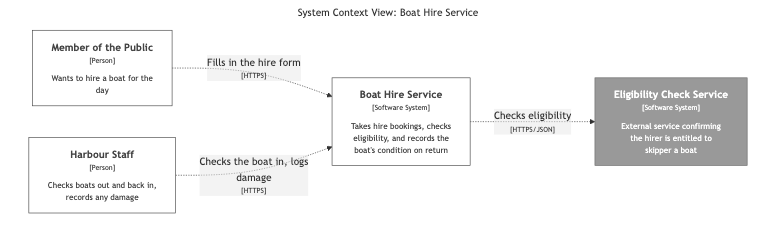
Notice it isn’t the C4Context syntax Mermaid also happens to support — Structurizr’s exporter writes a plain graph TB flowchart with styled, HTML-labelled nodes. That’s a deliberate choice on Structurizr’s part, and it doesn’t matter to us: whatever shape the Mermaid comes out in, this repository’s Makefile turns it into a PNG the same way it turns every other .mmd file into a PNG, via mmdc. And rendered:
Why the model, not the picture, is the artifact that matters
The diagram survives almost any internal rewrite to the boat hire service, because it’s drawn at the level of responsibility, not implementation — that’s true whether you draw it by hand or generate it, and it’s the standard case for why a Context diagram is worth having at all.
What generating it changes is what happens next. If I decide the eligibility check should instead be modelled as two separate systems, or I rename “Harbour Staff” to “Marina Staff,” I make that change in one place — the model — and every view downstream of it updates the next time I export. There’s no second diagram quietly still saying “Harbour Staff” because nobody remembered to update it by hand. The model is the single source of truth; the diagrams are disposable, regeneratable projections of it. That’s the whole pitch for diagrams as code, and Structurizr is what makes the model the thing you actually maintain, rather than the picture.
We’ll keep amending this same model across the rest of the series — each post adds the next slice of DSL on top of what came before, the same way this post’s model builds on nothing at all.
Where this is going
We’ve got a system and the handful of things around its edges. Next time, we amend the model: inside the Boat Hire Service box are a web application, a database and a queue, each of which can be built, deployed and scaled independently. We’ll add a container block for each, declare a new container view, and export it the same way — the Container diagram.
This post was first published on Medium on 19 October 2026.