OWASP Top 10 for Vibe Coders, Part 2: Broken Access Control (A01:2025)
The single most common serious problem on the web, explained with a McDonald’s counter, a guessed web address, and a tool called Postman.
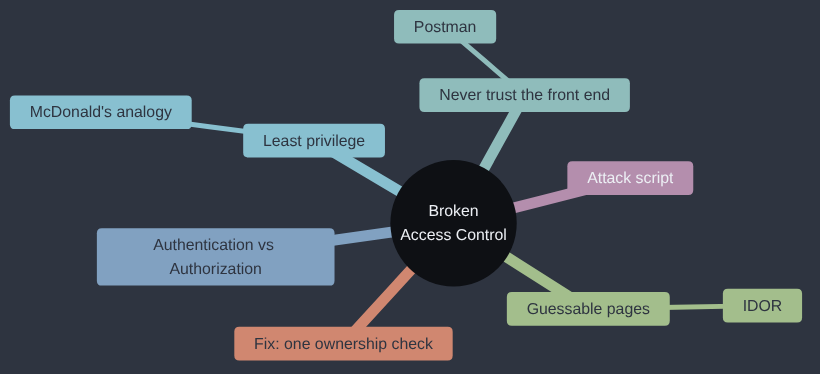
Broken Access Control is A01:2025 in the OWASP Top 10; OWASP’s own page for it goes into more depth if you want to read further.
I’ve not been bitten by this category directly, but I have seen how nervous it makes the people responsible for it. On one multi-tenanted SaaS product, every customer’s data lived in a single database, kept apart by checks in the code. Nobody could show a way to read one tenant’s data from another’s account. Even so, engineering leadership weren’t comfortable leaning on those checks, and we moved to one database per tenant, which is an expensive way to buy a good night’s sleep. I’ll admit that wasn’t my inspect-before-you-build rule in action, since we never proved anything was broken. It does show how seriously people who run these systems take the question this whole category comes down to: whose data is this request allowed to reach?
Broken Access Control sits at number one on the OWASP Top 10 for a reason: it is both extremely common and extremely damaging. It’s also, once you see it clearly, one of the easiest categories to understand. There’s no cryptography, no clever maths. It’s one question, asked (or not asked) at the right moment:
“Is this specific person allowed to do this specific thing, right now?”
Broken Access Control is what happens when your app forgets to ask that question — or asks it once, at the wrong point, and then trusts the answer forever.
Logged in is not the same as allowed in
Here’s a mix-up that trips up a huge number of people building their first real app: confusing “this person has a valid password” with “this person is allowed to do this.”
Those are two completely different questions, with two completely different names in security:
- Authentication is “who are you?” It’s your password, your login form, the bit that checks you are who you say you are.
- Authorization is “what are you allowed to do, now that I know who you are?” It’s a separate check, and it has to happen separately, every single time, for every single thing your app does.
A password proves identity. It proves nothing about permission. Knowing Bob’s password proves you’re Bob (or that you stole it). It says nothing at all about whether Bob — or whoever’s using his password right now — should be allowed to see customer Alice’s order history, or press the “refund everyone” button in the admin panel. Those are different questions, and your code has to ask both.
Least privilege, and why McDonald’s already understands it
The fix has a name: least privilege. It means giving every person — and every piece of code — only the access they actually need to do their job, and nothing more.
You’ve already seen a working example of this, possibly while ordering a Big Mac. A McDonald’s restaurant runs on strict least privilege, and nobody even has to think about it:
- A customer can order at the counter or the kiosk. That’s it. They cannot walk behind the counter, cannot go into the kitchen, cannot open the till. If a customer did climb over the counter, staff would stop them immediately, because everyone there knows instantly that it’s wrong — there’s no ambiguity, no “well, maybe they’re allowed.” That instant, obvious “no” is exactly what a web app is usually missing: the equivalent action — a customer’s account directly requesting an admin-only web address — often succeeds quietly, because nothing in the code was ever built to recognise it as a customer climbing over the counter in the first place.
- A crew member can go behind the counter, use the till, work the fryer. They typically can’t open the safe, authorise a refund over a certain amount, or change the prices on the menu boards.
- A shift manager can do what crew can do, plus handle bigger refunds, adjust a schedule, maybe access the safe.
- Even the store manager doesn’t have unlimited access to everything in the whole company — they can’t, say, change the national pricing strategy for the brand.
Nobody at McDonald’s gets handed a master key on day one “to keep things simple.” Each role gets exactly what it needs, and nothing gets left open “just in case.” Your web app needs the same discipline. A logged-in customer is the person at the counter. They should never be able to walk behind it just because they know the right web address.
Don’t trust the front end — ever
The mistake behind most real-world Broken Access Control bugs: building a check into your website’s interface, and assuming that’s enough.
First, two terms worth pinning down, because the rest of this section leans on the difference: the front end is everything that runs on the visitor’s own device — the HTML, CSS, and JavaScript their browser downloads and executes, the part they can actually see and interact with. The back end (or server) is the separate program running on a computer you control, that the front end talks to over the internet to actually fetch or change anything — your Flask app, in Sticker Shop’s case. The crucial fact is that these are two different programs, running on two different machines, and only one of them is yours once a visitor loads the page.
Say your Sticker Shop hides the “Refund this order” button unless the logged-in user’s role is admin. The JavaScript — running in the front end, on the visitor’s own machine — checks the role, and if it isn’t admin, the button simply doesn’t render. That feels like a security check. It is not one. It’s a convenience feature for people who were never going to misuse it anyway.
Here’s why. Your website’s front end is not a locked room. It’s a set of instructions you mailed to a stranger’s computer, and that stranger’s browser is now in complete control of what it does with them. They can read your JavaScript. They can edit it. They can ignore it entirely and just send requests straight to your back end using a different tool altogether.
That’s where Postman comes in — and tools like it: Insomnia, or just curl on the command line. These are simple, completely legitimate tools (developers use them every day to test their own APIs) that let you build and send an HTTP request by hand, with whatever headers, cookies, or data you like — no browser, no JavaScript, no hidden-button logic in the way at all. If your “security” was a hidden button, Postman walks straight past it, because Postman was never looking at your buttons. It’s talking directly to your back end, the same way your website’s JavaScript was the whole time — just without asking your JavaScript’s permission first.
The rule that falls out of this: every check has to happen on the back end, on every request, no exceptions. Not “the button is hidden.” Not “the page isn’t linked from the menu.” The reason it has to be the back end specifically, and not anywhere in the front end: the back end is the one part of this whole picture that stays entirely under your control, on your own server, the whole time. The front end, the instant it reaches someone’s browser, is under their control, not yours — so any check that lives only there is a check the attacker gets to decide whether to run. A check on the back end, by contrast, runs every single time, on a request that originated from a customer’s ordinary click or from Postman in someone’s hands with no browser involved at all, because the back end has no way to tell those two apart except by actually checking — which is exactly why it has to.
Back at McDonald’s, the same idea holds, and it helps to see the front end/back end split in a world without a keyboard at all. The menu board is the front end: it’s what the restaurant hands a customer to guide what they’re able to ask for, but it’s only a suggestion — nothing physically stops a customer from asking for something that isn’t on it. Imagine a customer who, instead of ordering at the counter, puts on a staff uniform they brought with them, walks round the back, and asks whoever’s nearest to hand them a box of frozen burger patties “for the delivery.” The menu never offered that. Nothing about the front end — the polite, printed list of burgers and fries — permitted it either. The only thing that was ever going to stop that request is a member of staff who checks who’s actually asking, every time, rather than just doing whatever the person in front of them asks because they’re standing in the right place wearing the right clothes. That’s the discipline a back end needs: it cannot “blindly do as requested” just because a request arrived looking like it came from the menu. It has to check who’s really asking, independently of what they’re dressed as, every single time.
Guessable pages: when the lock is just a low number
A related and very common version of this bug: an app that doesn’t bother checking because the page “isn’t really public” — it’s just not linked anywhere obvious. The assumption is that nobody will find /invoice/1001 unless you send them the link.
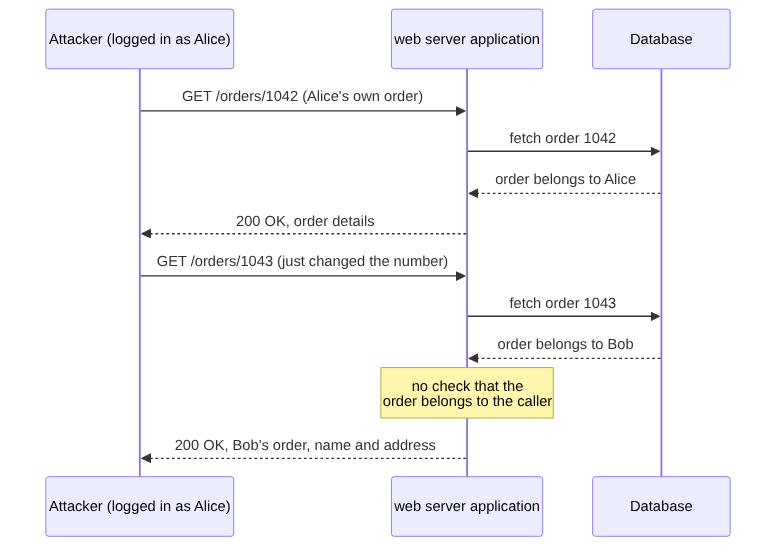
That’s “security through obscurity,” and it fails the moment someone notices a pattern. Order numbers, invoice numbers, user IDs — these are very often small, sequential integers, because that’s what databases hand out by default. If your own invoice is /invoice/1042, it costs an attacker nothing to try /invoice/1041, /invoice/1043, and keep going. No cleverness required. Just counting.
This specific flavour of Broken Access Control even has its own name: IDOR, or Insecure Direct Object Reference. It means a reference — a number, an ID — points directly at a real object (someone’s order, someone’s account, someone’s private message), and the app hands over whatever that reference points to without checking who’s asking.
Google can find your guessable pages for you
There’s a trick I’d want every builder to know about, even if you never open a hacking tool in your life, because it shows just how exposed “security through obscurity” really is: Google dorking, a set of special search operators that let you search inside what Google has already indexed, far more precisely than a normal search.
Two operators do most of the work:
site:example.comrestricts results to one website.inurl:orfiletype:narrow by what’s in the address or the kind of file.
Put together, a search like site:example.com inurl:admin looks for any page on that one site with “admin” in its web address, which is the kind of unlinked-but-not-actually-secret page a lot of small apps leave lying around. A search like filetype:env "DB_PASSWORD" looks for .env configuration files, anywhere on the web, that Google’s crawler has indexed and that happen to contain the text DB_PASSWORD. People leave these exposed more often than you’d hope, usually because a file that should never have been public got deployed into a folder the web server was quite happily serving to anyone who asked, and a search engine found it before its owner did.
None of this is hacking in any technical sense. It’s a search box. That’s what makes it dangerous: it costs an attacker nothing, and it finds the laziest version of “this isn’t linked, so it’s safe,” which is never actually safe.
Seeing it happen: an IDOR attack on Sticker Shop
Here’s a complete, runnable script that plays the attacker’s part against a (deliberately vulnerable) version of the Sticker Shop order page. It logs in as a perfectly ordinary customer, then walks through order numbers to see how many other people’s orders it can read.
import requests

BASE = "http://localhost:5000"
session = requests.Session()

# Step 1: log in as an entirely ordinary, low-privilege customer.
session.post(f"{BASE}/login", data={
    "email": "attacker@example.com",
    "password": "correct-horse-battery-staple",
})

# Step 2: this customer has exactly one order of their own: order 1042.
# The vulnerable app only checks "are you logged in?", not
# "is this YOUR order?" - so we just try nearby order numbers.
found = []
for order_id in range(1035, 1055):
    response = session.get(f"{BASE}/orders/{order_id}")
    if response.status_code == 200:
        found.append(order_id)
        print(f"Order {order_id}: {response.json()['customer_email']}")

print(f"\nRead {len(found)} orders while logged in as one customer.")
Thirteen lines of actual logic, and the result is a stranger’s name, email address and delivery address for every order in that range — because nothing on the server side ever asked “does this order belong to the person asking for it?”
The fix on the Flask side is a single extra check, not a redesign:
@app.route("/orders/<int:order_id>")
@login_required
def view_order(order_id):
    order = Order.query.get_or_404(order_id)
    if order.customer_id != current_user.id and not current_user.is_admin:
        abort(403)  # Forbidden - logged in, but not allowed to see THIS one
    return jsonify(order.to_dict())
So the fix is to fetch the order, then check it actually belongs to the person asking (or that they’re staff), before handing anything back. Every route that returns or changes someone’s data needs that question asked, every time, which in practice means going through your routes one by one rather than trusting that you remembered.
Why this fix exists
Early websites mostly served the same pages to everyone, so there was nothing to protect from one visitor to the next. As sites turned into applications with accounts, orders and baskets, the question “is this record yours?” suddenly mattered on every request, and the first instinct was to answer it in the interface, by only showing people links to their own things. OWASP named the failure early: “Insecure Direct Object Reference”, the guessable-ID bug above, had its own entry in the 2007 Top 10, and in 2017 it was folded into the wider Broken Access Control category. In 2021 that category went to number one, where it still sits in the 2025 list. The server-side ownership check is the fix that came out of all that, and it’s dull on purpose: it doesn’t trust where the request came from, only what the database says.
My take
If you only do one thing after reading this series, make it this one. Broken access control is a hole in the hull below the waterline: you can’t see it from the pontoon, nothing feels wrong when you step aboard, and you only find out when somebody else goes looking. I wouldn’t start with role hierarchies, a permissions framework or an admin screen for managing who can see what. Most small apps have two kinds of people, customers and you, and they don’t need a permissions system yet. They need every route that touches someone’s data to ask the ownership question, which is a few if statements, and one slow pass through the routes to check that none were forgotten. Build the elaborate version when you’ve got staff with different jobs to do; before that, it’s a dance floor on a boat that’s quietly taking on water.
Check your own code
You don’t need to be a security expert to go looking for this in your own project. Hand your AI coding assistant prompts like these, and read what comes back carefully:
- “List every route in this Flask app that takes an ID in the URL (like
/orders/<id>or/users/<id>). For each one, show me where it checks that the logged-in user actually owns or is allowed to access that specific record — and flag any route where that check is missing.” - “Go through every route that only shows or hides something in the frontend (a button, a menu item, a page) based on the user’s role. For each one, confirm the equivalent check also exists in the Flask route itself, not just in the template or JavaScript.”
- “Find every admin-only route in this app and show me exactly how it confirms the current user is an admin. Are there any admin routes with no such check, or where the check happens after the data has already been fetched or changed?”
You got this far. Fixing Broken Access Control is rarely a rewrite — it’s usually a handful of missing if statements, in the places these prompts will point you to.
Tested: I ran the scan script above against a small Flask Sticker Shop (Python 3.12.8 and Flask 3.1.3). With only a login check, the logged-in customer read all 20 orders in the range. With the ownership check in place, they read one: their own. The runnable version is in this gist.
Next in the series: Cryptographic Failures — what happens when the data you’re protecting was never actually protected at all.
This post is part of the OWASP Top 10 for Vibe Coders series; the first post introduces the series and what’s in it.