OWASP Top 10 for Vibe Coders, Part 3: Cryptographic Failures (A04:2025)
Your database got stolen. Does that ruin your users’ day, or does it barely matter? The honest answer depends entirely on this one category.
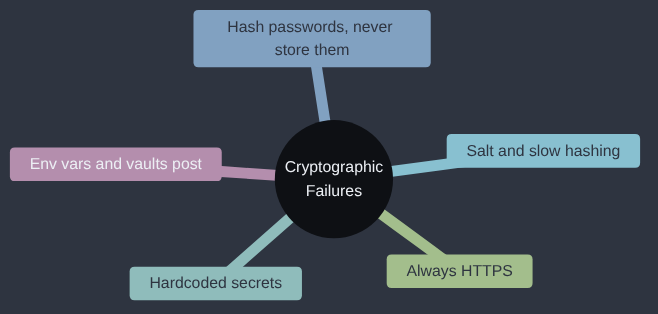
Cryptographic Failures is A04:2025 in the OWASP Top 10; OWASP’s own page for it goes into more depth if you want to read further.
Anyone who has worked with legacy systems has probably met passwords stored in plain text, and I met them as recently as two years ago. The company I was working for had taken over another business, whose product was well received and filled a real gap for us, but whose engineering practices were not fantastic. Plain-text passwords were simply the way things had always been done there, and to some of the engineering leadership that was reason enough to leave them. Turning it from a legacy app with several engineering issues into a much more compliant one took, as I recall, about three months. Storing passwords properly from day one would have taken an afternoon, which is most of the reason this article exists.
If you’ve ever wondered what your app would give away if the database walked out of the door tomorrow, this one is for you.
Here’s a sentence that should worry every vibe coder reading it: databases get stolen all the time, and it is not always preventable. A misconfigured backup, a leaked credential, a vulnerable server somewhere in the chain — sooner or later, for a huge number of real companies, someone ends up with a copy of the database they were never supposed to have. The entire point of this category of the OWASP Top 10 is to make sure that, when that happens to you, it’s a bad day instead of a catastrophe.
Cryptographic Failures cover anything where sensitive data — passwords, card numbers, personal details — wasn’t properly protected, either while it was sitting in your database or while it was travelling across the internet. The word “cryptographic” makes it sound like advanced maths. In practice, for a small app, it mostly comes down to three very learnable habits.
Habit one: never store a password, store a hash of one
This is the single most important rule in this whole category, so let’s be precise about it: you should never be able to look at your own database and see a user’s actual password. Not even you, the person who built the app, should be able to read it back out.
The tool for this is a hash function: a one-way mathematical transformation. You put a password in, you get a scrambled string out, and — crucially — there is no way to reverse that process and get the original password back. When someone logs in, you don’t “decrypt” their stored password and compare it. You hash the password they just typed, using the same function, and check whether the result matches what’s stored. The real password is never kept anywhere, by anyone, ever.
The trap a lot of beginners fall into is using a hash function that’s fast and simple — like MD5 or plain SHA-1 — assuming “it’s scrambled, so it’s safe.” It isn’t, and here’s a short, complete demonstration of exactly why, using nothing but Python’s standard library and a small list of common passwords (the kind every real breach shows people still use):
import hashlib

# A tiny slice of the kind of list real breaches are full of.
COMMON_PASSWORDS = ["123456", "password", "qwerty", "letmein", "iloveyou"]

# Pretend this hash leaked from a database that used plain MD5,
# with no salt - a genuinely common beginner mistake.
leaked_hash = "0d107d09f5bbe40cade3de5c71e9e9b7"

# Build a lookup table: hash of each common password -> the password.
cracked = {hashlib.md5(pw.encode()).hexdigest(): pw for pw in COMMON_PASSWORDS}

if leaked_hash in cracked:
    print(f"Password recovered instantly: {cracked[leaked_hash]}")
else:
    print("Not in this tiny list - but a real attacker's list has billions.")
Run it, and the sixteen-line lookup instantly recovers the password. That’s not a clever attack — it’s a dictionary with the keys swapped round. Real attackers don’t use five passwords, they use lists with billions of entries (pulled from every previous password breach in history), and they’ve pre-computed the MD5 or SHA-1 hash of every single one, ready to be matched the instant they see a leaked, unsalted hash. MD5 and SHA-1 were built to be fast — great for checking a file hasn’t been corrupted, terrible for passwords, because “fast” is exactly what makes guessing billions of them cheap.
The fix: a slow hash, with a unique salt
Two things need to be true of a proper password hash, and purpose-built password-hashing functions give you both automatically:
- It has to be deliberately slow. Not slow enough to annoy a real user logging in once, but slow enough that guessing billions of passwords against it takes an attacker an impractically long time.
- It needs a unique salt per password. A salt is random data mixed in before hashing, stored alongside the hash. It means two users with the identical password
password123get two completely different stored hashes, and an attacker can’t pre-compute one giant lookup table that works against every user at once — they’d have to redo the (slow) work for every single salt, separately.
In Flask, you don’t need to build any of this yourself. Werkzeug — which Flask already depends on — ships it:
from werkzeug.security import generate_password_hash, check_password_hash

# On signup: generate_password_hash handles salting and slow hashing for you.
stored_hash = generate_password_hash("correct-horse-battery-staple")

# On login: compare the typed password against the stored hash.
if check_password_hash(stored_hash, typed_password):
    log_the_user_in()
That’s two lines, using a library Flask already installed for you, so there isn’t much of a case for doing anything else.
What an unsalted, fast hash actually costs you
Let’s be concrete about the scale here, because “crack it instantly” can sound like an exaggeration until you see the numbers. A single high-end gaming graphics card computes MD5 hashes at a rate measured in billions per second: hashcat users benchmarking an RTX 4090 have posted runs of around 150 to 165 billion MD5 hashes a second (one such run, on hashcat 7.0.0), and the exact figure moves with the driver and settings. That’s not a specialist tool, it’s the same kind of hardware people use for gaming. I haven’t run that benchmark myself, so take the precise number as theirs, but the arithmetic doesn’t need it to be precise: at even a tenth of that speed, hashing a breach list of several billion entries takes a few seconds, so against a database of a few thousand users with unsalted MD5 passwords, an attacker with one such card can work through every password on that list in well under a day, recovering the plain password for the overwhelming majority of accounts, especially the ones reusing a common or previously-leaked password. Against a database using a proper slow hash with per-user salting, the same hardware manages thousands of guesses per second rather than billions, per password, with the exact figure depending on the algorithm and how high its work factor is set — and because every user has a different salt, there’s no shortcut that covers more than one account at a time. The difference between “most passwords cracked by dinner” and “effectively impractical to crack at scale” is entirely down to which function you called when you wrote generate_password_hash versus hashlib.md5, and it costs nothing extra to choose correctly.
Habit two: don’t hardcode secrets into your code
A SECRET_KEY, a database password, an API key for a payment provider — these all need to exist somewhere, but “typed directly into a .py file that gets committed to your git repository” is the wrong somewhere. Once it’s in git history, it’s there permanently, even if you delete it in a later commit — and if that repository is ever public, or ever leaks, every secret in it is instantly compromised.
(The full story — .env files, CI/CD pipeline secrets and how they can still leak through log output, and what a secrets vault adds on top — gets its own article a little later in this series, since there’s a lot more to say than fits here.)
The fix is environment variables, loaded at runtime, never written into the code itself:
import os
app.config["SECRET_KEY"] = os.environ["SECRET_KEY"]
The actual value lives in your hosting platform’s environment variable settings, or in a local .env file that’s listed in .gitignore and never committed — not in a file git is tracking.
Habit three: always HTTPS, never plain HTTP
The third habit is about data in transit rather than data at rest. HTTP sends everything — including the password someone just typed into your login form — as plain, readable text across the network. Anyone positioned between that person and your server (an attacker on the same public wifi, for instance) can simply read it as it goes past. HTTPS encrypts that connection end to end. Every reputable hosting platform makes this close to automatic now (GitHub Pages, for instance, enforces it by default), so this is one habit that mostly just means not turning it off.
Why this fix exists
Storing a hash of a password, and not the password, is older than the web. Unix systems in the 1970s were already doing it, and in 1979 Robert Morris and Ken Thompson’s paper on Unix password security described adding a salt, so that the same password wouldn’t produce the same stored value for two users and precomputed tables stopped working. The next problem was speed: computers kept getting faster, and a hash that was slow in 1979 was quick a decade later. In 1999, Niels Provos and David Mazières designed bcrypt with a cost setting you can turn up as hardware improves, and the modern options, scrypt and Argon2 among them, follow the same idea. generate_password_hash is the end of that forty-year story, packaged so that you don’t need to know any of it.
My take
Weak password storage is a leak you can’t see from the cockpit: everything is fine right up until someone else has a copy of the database, and then everything is wrong at once. This is one place where I’d say there’s no decision to make. Use the library’s slow, salted hash and stop thinking about it; the moment you’re choosing hash algorithms yourself, you’ve volunteered for a job that people far better at it have already done. What I wouldn’t build yet is your own encryption layer for data at rest, a key-management service, or anything with “custom” in front of “crypto”. Fix the three habits in this article, and come back to the cleverer material when an auditor or a customer contract asks for it, which is usually the point at which it’s needed.
Check your own code
- “Search this codebase for anywhere a password is hashed or compared, and tell me which hash function is used. Flag it if it’s MD5, SHA-1, or SHA-256 used directly, instead of a proper password-hashing function like Werkzeug’s
generate_password_hashorbcrypt.” - “Search this repository, including git history if possible, for anything that looks like a hardcoded secret - API keys, passwords, a
SECRET_KEYvalue - typed directly into a source file rather than loaded from an environment variable.” - “Check how this app’s database stores sensitive fields (passwords, payment details, personal information). Is anything stored as plain, readable text that should instead be hashed or encrypted?”
Before anything of mine goes live, I check that no secret is sitting in the code or the repository, because that’s the one that turns a small leak into a large one.
Tested (Python 3.12.8 and Flask 3.1.3, Werkzeug 3.1.9): the MD5 script recovers the leaked hash instantly (it’s letmein). generate_password_hash gave a different hash on every call for the same password, which is the salt at work. Code: gist.
Next in the series: Authentication Failures — what happens when the question “are you really who you say you are?” doesn’t get a reliable answer.
This post is part of the OWASP Top 10 for Vibe Coders series; the first post introduces the series and what’s in it.