OWASP Top 10 for Vibe Coders, Part 4: Authentication Failures (A07:2025)
Your login form asks the right question. This category is about what happens when the app doesn’t actually enforce the answer.
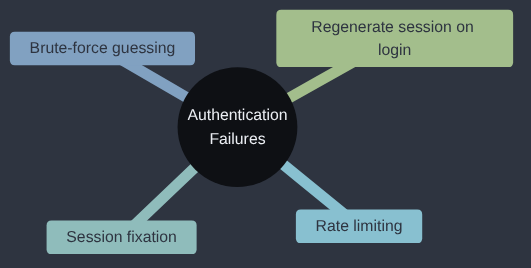
Authentication Failures is A07:2025 in the OWASP Top 10; OWASP’s own page for it goes into more depth if you want to read further.
Brute-forcing a login is an old problem, old enough that at a number of places I’ve worked it had its own spot on the wall. A dashboard showing login activity would sit on a screen in the office, and every so often a panel would turn pink to say, more or less, that somebody was trying to get in. It was a regular sight, which says something about how common these attacks are. Those attacks were seen well in advance and reacted to well in advance, because the login activity was recorded and there are plenty of libraries and tools to help you spot a brute-force attack as it happens. The real problem would have been the number of failed logins rising while the panel never turned pink. This article is about making that attack slow and noisy in the first place.
If your login form works and you’ve never asked what happens on the ten-thousandth wrong password, this one is for you.
A couple of articles back, we drew a clear line between authentication (“who are you?”) and authorization (“what are you allowed to do?”), while covering Broken Access Control. This category comes back to authentication itself, and asks a narrower question: even when your app does correctly check a password before logging someone in, are there weaknesses in how it does that checking, or in what happens immediately after?
Two very common failures live here, and they feel almost opposite to each other: one is about an attacker guessing their way in with brute force, and the other is about an attacker sneaking in without ever needing to guess anything at all.
Failure one: nothing stops unlimited guesses
Think back to the previous article, on Cryptographic Failures, where a leaked password hash got cracked almost instantly using a small list of common passwords. That attack worked offline — against a hash the attacker already had a copy of. Authentication Failures cover something related but distinct: an attacker who doesn’t have your database at all, just your ordinary public login form, trying password after password directly against it.
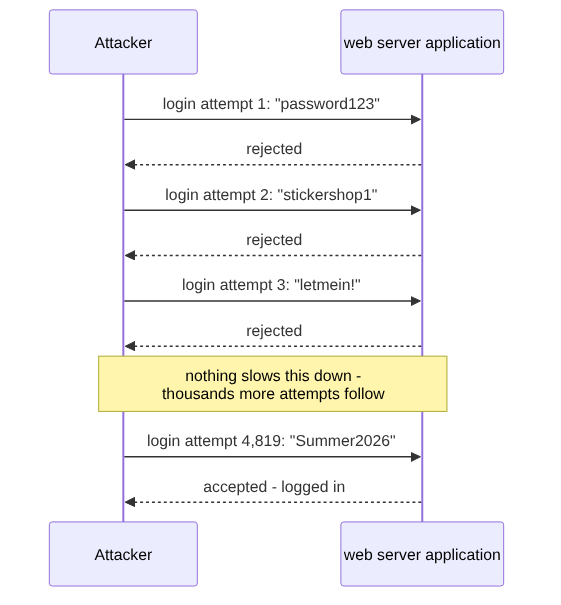
That should be much slower and much harder than an offline attack. Often, it isn’t — because nothing stops them:
import requests
import time

BASE = "http://localhost:5000"
target_email = "owner@stickershop.example"

# A small slice of what real attackers use: lists with millions of
# real, previously-breached passwords, tried against any login form
# that doesn't push back.
COMMON_PASSWORDS = ["password123", "stickershop1", "letmein!", "Summer2026", "qwerty123"]

for password in COMMON_PASSWORDS:
    response = requests.post(f"{BASE}/login", data={
        "email": target_email,
        "password": password,
    })
    if response.status_code == 200:
        print(f"Logged in! Password was: {password}")
        break
    else:
        print(f"Tried '{password}' - rejected")
    time.sleep(0.1)  # polite, not that it needs to be
Strictly speaking, that script is a brute-force guess loop: one account, a generic list of likely passwords, tried one after another until something sticks. Its better-known cousin is credential stuffing, where the list isn’t guesses at all but real email-and-password pairs leaked in some other site’s breach, and that one is extremely effective in practice, because so many people reuse the same password across multiple sites. Both lean on the same weakness in your app, though. If your login endpoint accepts attempt after attempt with no consequence, this twenty-two-line script (or a purpose-built tool doing the same thing at far greater scale) can work through an enormous list completely unattended, whichever kind of list it was handed.
The fix is to make guessing expensive. A few layers, any one of which helps, and which combine well:
-
Rate limiting — refuse more than a handful of attempts per minute from one source, so repeated guessing hits a wall instead of running unattended:
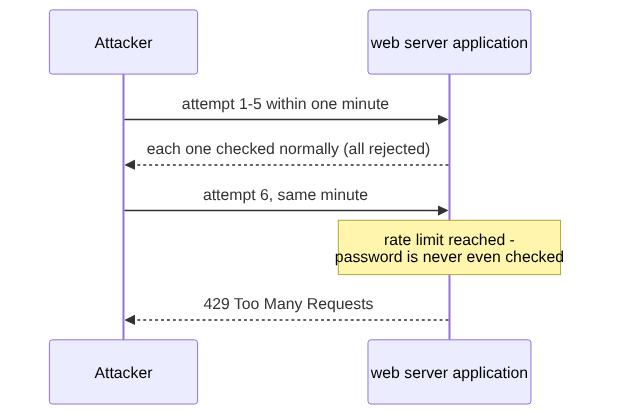
In Flask, a library like
Flask-Limiterdoes this in a few lines:from flask_limiter import Limiter limiter = Limiter(key_func=lambda: request.remote_addr, app=app) @app.route("/login", methods=["POST"]) @limiter.limit("5 per minute") def login(): ... - Account lockout or increasing delays after repeated failures on one specific account.
- Generic error messages. “Invalid email or password” — never “that email doesn’t exist” versus “wrong password” as two different messages, which hands an attacker a free way to check which email addresses are even worth attacking.
- Multi-factor authentication, so a correct password alone isn’t enough to log in anyway.
Why does credential stuffing work as well as it does in practice? It relies on humans being delightfully and horribly human. It doesn’t need to guess well, because it can count on reuse. Studies of real password breaches keep finding a large share of people reusing the same password, or an obvious variation of it, across multiple unrelated sites. One of the best known, Das and colleagues at NDSS 2014, compared leaked passwords from eleven sites and estimated that 43 to 51 percent of users reuse a password across sites; later studies on other populations have found lower rates, but none of them low enough to be comforting. That means an attacker doesn’t need to know anything about your specific users at all — they just need a breach dump from some other, completely unrelated website your users also happened to use, and a login form that doesn’t push back on repeated attempts. The password being “strong” in the abstract sense doesn’t help if it’s also sitting in a breach list from a site that got compromised two years ago.
Failure two: the session itself can be hijacked, with no guessing at all
The second failure doesn’t need any guessing. It targets the session — the mechanism that keeps someone logged in after that first successful check — and specifically a bug called session fixation.
I’ll say this up front, because it matters for the Sticker Shop: Flask’s default sessions aren’t exposed to the classic form of this attack, and I’ll come to why in a moment. Plenty of other setups are, though, and if you ever move the shop to a server-side session store, or pick up a project in another framework, this is the bug to have in the back of your mind.
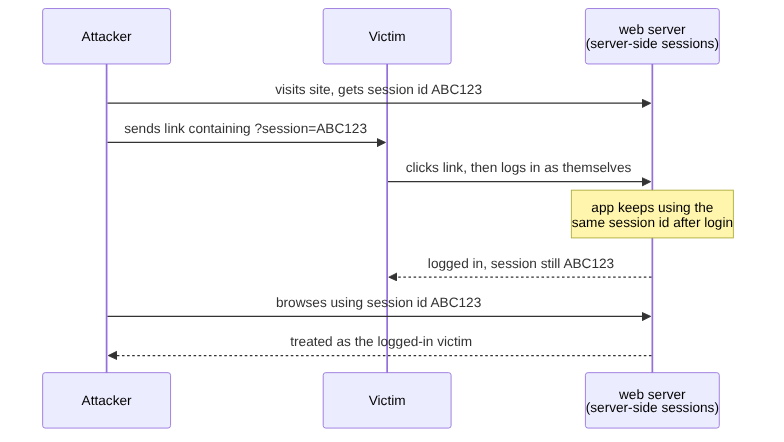
Here’s the sequence, step by step, in an app that keeps each session on the server and hands the browser only a session ID to quote back (PHP’s built-in sessions, Express with express-session, or Flask with a server-side extension such as Flask-Session all work this way):
- The attacker visits the site themselves, completely normally, and is handed a session ID — say,
ABC123— before ever logging in. - The attacker sends the victim a link that embeds that same session ID (sometimes via a URL parameter, sometimes by other means depending on how sessions are implemented).
- The victim clicks the link and logs in as themselves, entering their own, correct password.
- This is the bug: if the app doesn’t generate a brand-new session ID at the moment of login, the victim is now logged in — using the same session ID the attacker already knew.
- The attacker uses
ABC123themselves. The app has no way to tell the difference between the victim and the attacker, because as far as the session is concerned, they’re the same session.
No password was guessed, stolen, or cracked anywhere in that sequence. The weakness was entirely in session handling — specifically, treating a session ID as permanently trustworthy, rather than something that should be refreshed the moment someone’s privilege level changes (anonymous visitor to logged-in user is exactly such a change).
Why Flask’s default sessions dodge it
Flask, out of the box, doesn’t keep a session on the server at all. The whole session, user_id and anything else in it, lives inside the cookie itself, signed with the app’s SECRET_KEY so that the browser can read it but can’t change it without breaking the signature. That means there’s no session ID sitting on the server for an attacker to plant and then wait on. When the victim logs in, the app writes user_id into the session, Flask signs the new contents and sends back a different cookie; the cookie the attacker planted still holds exactly what it held before, which is to say nobody logged in. I tried this against the Sticker Shop with its login fix switched off, and the planted cookie still got a 401 from /account after the victim had logged in with it.
That doesn’t make the fix pointless in Flask, it changes what it’s for. Without it, anything already sitting in the session before login rides along into the logged-in session, including whatever was in a cookie the attacker got for themselves and handed over. Clearing the session at login is cheap, and it keeps the habit in place for the day you switch to a server-side store, where it stops being tidiness and becomes the actual defence.
Wherever the session lives, the fix is one call in the right place: start a fresh session the instant login succeeds, so whatever existed beforehand is discarded.
from flask import session

@app.route("/login", methods=["POST"])
def login():
    user = authenticate(request.form["email"], request.form["password"])
    if user:
        session.clear()               # drop anything from before login
        session["user_id"] = user.id  # Flask issues a fresh session from here
        return redirect("/account")
    abort(401)
With Flask’s default sessions, session.clear() before setting the new logged-in state means the logged-in cookie carries nothing over from before. With a server-side store you also want a new session ID, not just an emptied session, so use whatever your framework provides for that at login: Django’s login() does it for you, PHP has session_regenerate_id(), and express-session has req.session.regenerate().
ASP.NET Core, if that’s where you spend your days, sits much closer to Flask than to PHP here. Its cookie authentication (HttpContext.SignInAsync) keeps the signed-in user in an encrypted cookie, protected by its Data Protection system, and writes a fresh one when someone signs in, so there’s no server-side ID for an attacker to fix. It also has a separate, server-side session feature (HttpContext.Session, with its own .AspNetCore.Session cookie), and that one isn’t tied to signing in at all: it keeps the same ID either side of a login. So the same advice applies there as in Flask, which is to let the authentication cookie decide who the user is, never the session, and to clear the session at sign-in (HttpContext.Session.Clear()) if you keep anything in it that matters.
Why this fix exists
Passwords were always going to be guessed, and the fixes in this article arrived roughly in the order the attacks did. Account lockout and rate limiting came first, as soon as login forms were reachable by anyone with a script. Session fixation was described in 2002 by Mitja Kolšek of ACROS Security, which is why frameworks such as Django now issue a new session ID at login without being asked. Then the big breaches of the 2010s put enormous numbers of real email and password pairs into circulation, which is what made credential stuffing cheap and multi-factor authentication worth its extra step. None of these fixes is new. Each one exists because the previous one stopped being enough.
My take
Authentication is the companionway hatch: everyone on board uses it, and it’s the one way below that should always be properly locked when you step ashore. I’d do three things and stop there for now: put a rate limit on the login route, make the error messages say the same thing whether the email exists or not, and offer two-factor authentication if your users have anything worth stealing. What I wouldn’t do is write my own login system, password-reset flow or session handling from scratch, because this is the place a purpose-built library earns its keep (Flask-Login, or your framework’s own auth). Single sign-on, identity providers and passkeys are good tools that I’d reach for when there’s a real reason, such as staff accounts or a customer asking for it, and not because a blog post made them sound modern. Including, I’m aware, some of mine.
Check your own code
- “Check the
/loginroute in this Flask app. Is there any rate limiting or lockout after repeated failed attempts from the same source? What would currently stop someone submitting thousands of password guesses in a row?” - “Check what happens to the session at the moment of a successful login in this app. Is a new session created, or does the app keep reusing whatever session existed before the user logged in?”
- “Check the error messages returned by the login and ‘forgot password’ routes. Do they ever reveal whether a given email address has an account, as distinct from the password being wrong?”
Tested (Python 3.13.16, Flask 3.1.3, Flask-Limiter 4.1.1): the brute-force loop found the password on its fourth guess, and 40 further wrong guesses were all simply rejected. With 5 per minute, attempts one to five got 401 and attempts six onwards got 429. One correction from testing: current Flask-Limiter wants the key function first and app as a keyword, so Limiter(app, key_func=...), the form older tutorials use, raises a TypeError. The snippet above uses the form that runs. For session fixation, with session.clear() switched off, logging in with a planted cookie got a different cookie back and the planted one was still refused with 401, which is why the Flask default isn’t exposed. The attack against a server-side session store was not run, and the Django, PHP, Express and ASP.NET Core behaviour comes from their documentation rather than from running them. Code: gist.
Next in the series: Security Misconfiguration — what happens when the app itself is fine, but something left switched on around it hands the keys away for free.
This post is part of the OWASP Top 10 for Vibe Coders series; the first post introduces the series and what’s in it.