OWASP Top 10 for Vibe Coders, Part 5: Security Misconfiguration (A02:2025)
Your code can be perfectly fine and your app can still be wide open — because of a setting, not a bug.
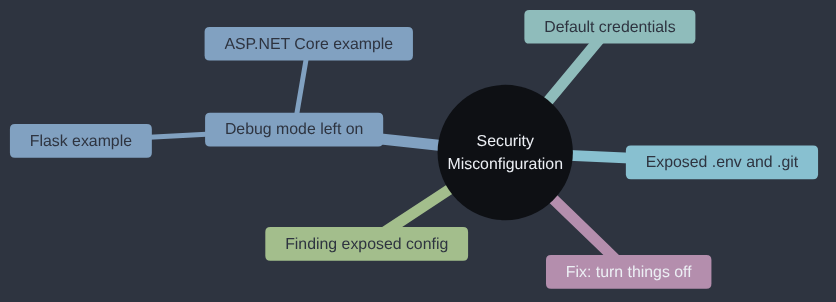
Security Misconfiguration is A02:2025 in the OWASP Top 10; OWASP’s own page for it goes into more depth if you want to read further.
One of my favourite misconfiguration stories doesn’t involve a computer at all. In How I Rob Banks, the penetration tester known as FC (Freaky Clown) describes getting into a building through a revolving door that had been left in technician mode. In that mode, if I remember the details right, the door opened by itself once a day, so he timed it, waited, and slipped through as it opened. Afterwards he showed the client how to put it back into normal operating mode, which closed the gap. Nothing about the door was broken; it had simply been left in the setting the engineer used to service it, which is most of this article in one revolving door. I can thoroughly recommend the book, by the way.
If your app went live with the same settings you built it with, this one is for you.
Every OWASP category so far in this series is about something your code does wrong. Security Misconfiguration is different, and in a way it’s the sneakiest one, because the code itself can be completely correct. The problem sits around the code — in a setting left on, a file left reachable, a default left unchanged — and it quietly undoes everything the code got right.
What “misconfiguration” actually means
Think of your app as a house. Broken Access Control, which we covered a few articles back, is like forgetting to put a lock on the bedroom door. Security Misconfiguration is different: the locks are all fine, but you left the back door propped open while you were moving furniture in, and never went back to close it.
Nothing is “wrong” with the lock. You just forgot a setting. In a web app, that usually looks like one of these:
- Debug mode left on in production. Frameworks like Flask have a debug mode that’s wonderful while you’re building the app — it shows you detailed error pages with full stack traces, variable values, even an interactive console right in the browser so you can poke around when something crashes. It is also an enormous gift to an attacker if it’s still switched on once real strangers can reach your site.
- Secrets left where the public can fetch them. A
.envfile is a plain text file, usually sitting right at the root of your project, that holds settings and secrets your app needs at startup — a database password, an API key, yourSECRET_KEY— each written asNAME=valueon its own line. It’s meant to be read only by your app itself, on the server, never by a visitor’s browser. The trouble is, a.envfile is just a file like any other, and if it ends up inside the folder your web server serves to the public — which is very easy to do by accident, especially if you’ve copied your whole project folder onto the server exactly as it sits on your laptop — then asking for it by name (yoursite.com/.env) hands it straight to whoever asks, in full. The same applies toconfig.py(your app’s settings file, which might import or even contain those same secrets directly) and a.gitfolder (the hidden folder that holds your entire project’s version history — if that’s reachable, an attacker can reconstruct your whole repository, past commits included, even ones you thought you’d since cleaned up). - Default credentials, never changed. Admin panels, databases, and management tools often ship with an obvious default username and password, meant to be changed on day one. A lot of them never are.
- Unnecessary things left switched on. Directory listing (so visiting a folder shows every file in it), an old test route nobody removed, a database admin tool bound to a public address instead of just
localhost.
None of these are “bugs” in the sense of a typo in your logic. They’re all settings — things that were fine, even necessary, at some point (usually while you were developing), and were simply never turned off again before the app went live.
Why “debug mode” is the one to really watch
Every web framework, in every language, ships some version of a “debug mode” or “development mode” setting, and it deserves special attention here, because it’s the default a lot of beginner tutorials — and a lot of AI-generated starter code — reach for, and because what it exposes is serious, not just embarrassing. You don’t need to know which framework your own app uses to recognise the pattern: somewhere in its settings is a switch, usually on by default while you’re building, that trades safety for convenience. Two concrete examples, so the shape of it is clear whichever world you’re in: in Python’s Flask, it’s app.run(debug=True) or an environment variable called FLASK_DEBUG; in .NET’s ASP.NET Core, it’s the “Developer Exception Page,” switched on automatically whenever ASPNETCORE_ENVIRONMENT is set to Development. Different names, same underlying trade, and the same risk if either one is still switched on once real strangers can reach the site.
Why do AI assistants reach for this kind of setting so readily? It isn’t random. These models learn from an enormous amount of publicly shared code, and a large share of publicly shared code — tutorials, personal projects, Stack Overflow answers, “getting started” repositories — was written by people in the position this series is written for: building something for the first time, optimising for “get it running,” not for “keep it safe once it’s live.” Professional engineers write plenty of secure code too, but a lot of that code sits inside private company repositories most AI training never sees at all — by the time it’s protecting something real, it’s usually also become commercially private. The result is a training imbalance: ask an assistant for “a quick web app” and the shortest path through everything it’s seen often does turn development mode on, because that’s overwhelmingly what the examples it learned from actually show. None of that makes the AI wrong to be careful of — it makes this exact kind of setting worth double-checking every time, specifically because it’s the default the training data would nudge towards.
With debug mode on, an unhandled error doesn’t just show a generic “500 Internal Server Error.” It shows a full interactive traceback in the browser: the exact line of code that failed, and the value of every variable at that point. In Flask specifically, it goes one step further, and it’s useful to know about even if you’re not using Flask, because it shows just how serious this category of setting can get: the error page includes a live, interactive console, sitting right there in the browser, that lets whoever’s looking at it run arbitrary code on your server. Flask’s own library (Werkzeug) does try to protect that console behind a PIN, but that PIN is often derivable, or simply never comes into play if the debugger was never meant to be reachable from the internet at all — which is the whole point: this feature was built for you, sitting at your own laptop, debugging your own code. It was never built to be safe to expose to the public internet, and Flask’s own documentation says so in plain terms. The setting that makes your life easier in development is the same setting that can hand a stranger a terminal on your server in production.
Finding what’s been left exposed
You don’t need any special tools to go looking for accidentally-exposed configuration. A plain HTTP request to a predictable path is often all it takes — which is exactly why this category is so common: the mistake is cheap to make, and just as cheap to find.
import requests

BASE = "http://localhost:5000"

# Paths that should never be reachable on a real, live app.
# Each one is a common beginner mistake, not an exotic attack.
SUSPECT_PATHS = [
    "/.env",                # environment variables, often with real secrets
    "/config.py",           # app config, sometimes including SECRET_KEY
    "/.git/config",         # a deployed .git folder leaks your whole repo
    "/debug",               # a leftover debug/test route
    "/admin",               # an admin panel, maybe with default creds
]

for path in SUSPECT_PATHS:
    response = requests.get(BASE + path)
    if response.status_code == 200:
        print(f"EXPOSED: {path} -> {len(response.text)} bytes returned")
        print(response.text[:200])
        print("-" * 40)
That’s the entire script: a list of paths that should never return anything to the public, and a loop that checks which ones do. It’s the digital equivalent of walking round a building checking which doors open, which is roughly the level of sophistication involved. The damage isn’t in the script; it’s in what a 200 OK on /.env actually hands over: database passwords, API keys, your SECRET_KEY (the value Flask uses to sign session cookies — if that leaks, an attacker can forge valid-looking login sessions for any user, including an admin).
The fix is mostly about turning things off
Unlike some OWASP categories, the fix here rarely means writing new code. It usually means removing or disabling things that should never have shipped:
- Run with debug/development mode off in production, full stop —
debug=Falseand noFLASK_DEBUG=1in Flask,ASPNETCORE_ENVIRONMENTset toProductionrather thanDevelopmentin ASP.NET Core, and the equivalent switch in whatever you’re using. Most hosting platforms (and themake builddeploy step in this very blog’s own repo, as it happens) are set up so “production” and “debug” are never the same deployment. - Keep
.env,.git, and any config files outside the folder your web server serves publicly — or better, outside the deployed app entirely, provided only as real environment variables by your hosting platform. - Change every default password the moment you install anything — a database, an admin tool, a CMS plugin.
- Turn off directory listing on your web server, and delete routes you added “just to test something” once the test is done.
What this actually costs, in sequence
Walk through how small this chain of events really is, start to finish, because “misconfiguration” sounds abstract until you see the whole sequence laid out. A solo developer finishes a feature late on a Sunday, with Flask’s debug mode still switched on because it made fixing the last bug easier. They deploy straight from that branch, intending to flip debug off “before anyone really uses it.” Monday morning, real traffic starts arriving. Someone — not even targeting this app specifically, just automatically scanning a huge range of websites for exactly this kind of mistake — sends a request that happens to trigger an unhandled error. Debug mode obliges: full stack trace, variable values, including the database connection string. From there, nothing more clever is needed. The attacker now has read-write access to the entire database, and the original developer finds out only when customers start reporting stickers they never ordered, or an email arrives saying the database has already been copied and will be published unless a fee is paid. None of that required skill. It required one setting, left on, for one weekend too long.
Why this fix exists
Software has usually shipped set up for the person installing it, because that’s who decides whether to keep using it, and an install that works first time beats one that asks awkward questions. The bill for that convenience arrived in public. In early 2017, attackers wiped tens of thousands of MongoDB databases that had been left listening on the open internet with no password, and left ransom notes in their place; the easy setup had been the exposed one. MongoDB made listening only on the local machine the default from version 3.6, and “secure by default” has gradually become the expectation for frameworks and cloud services, which is why Flask’s debug mode is off unless you ask for it. The fix in this article is the same idea applied by hand: anything you set up for your own convenience gets turned off before the app meets strangers.
My take
Misconfiguration is the boat left on her mooring with the hatches open: nothing’s broken, everything is working as designed, and the rain gets in anyway. I’d put this check near the top of the list, because it costs nothing and needs no new code at all, only a slow walk round the deployment looking for things you switched on while building and never switched off. What I wouldn’t do at this stage is buy a configuration-scanning product or write a hardening policy document. Run the five-path check from this article, read your deployment settings out loud to yourself (the mild embarrassment does half the work), and close what’s open. When you’ve got several environments and a team changing them, that’s the point to reach for proper tooling, because that’s the problem it was built for.
Check your own code
Hand these to your AI coding assistant and read the answers properly — this is one category where the AI can do most of the legwork for you, because it’s mostly pattern-matching against known bad defaults:
- “Check this app for a development or debug mode setting being enabled anywhere, in whatever form this framework uses it (Flask’s
app.run(debug=True)/FLASK_DEBUG, or the equivalent for whatever this project is actually built with), and tell me whether any of them could end up active in a production deployment.” - “List every file in this repository that looks like it could contain secrets —
.env, config files, anything withSECRET,PASSWORD, orAPI_KEYin it — and tell me whether any of them are inside a folder that gets deployed and served publicly, rather than being provided as real environment variables.” - “Look at how this app’s deployment is set up and tell me what would happen if someone requested
/.git/config,/.env, or a directory listing of the static files folder directly — would the server actually serve any of them?”
Misconfiguration is the category where “I’ll fix it properly later” costs you the most, because there’s rarely a later — the setting just sits there, quietly open, until someone finds it.
Before anything of mine goes live, I switch debug off and check from outside the network that nothing like .env or .git answers.
Tested: against the same Flask Sticker Shop (Python 3.12.8 and Flask 3.1.3), with placeholder secrets, all five suspect paths returned 200 in the careless version and none did once they were removed. I did not run Flask’s interactive debugger, so the debug-console description comes from Flask’s own documentation. Code: gist.
Next in the series: Environment Variables, .env Files and Secrets Vaults — where your secrets should actually live, from a .env file on your laptop to a vault, and how they still leak through a build log.
This post is part of the OWASP Top 10 for Vibe Coders series; the first post introduces the series and what’s in it.