OWASP Top 10 for Vibe Coders, Part 6: Environment Variables, .env Files and Secrets Vaults
The Cryptographic Failures article said “use environment variables, not hardcoded secrets” in one paragraph, and the Security Misconfiguration article showed what happens when a .env file ends up where anyone can fetch it. This one is the rest of that story — including the part where “environment variable” quietly stops being as safe as it sounds.
Secrets in environment variables are always a favourite at architecture review boards. Everyone says the one that slipped into the code is only for pre-production, and nobody really believes it. At best it looks sloppy. At worst it can never really be removed, because if you dig back far enough through the Git history, you’ll find it. That sounds like hard work for a human, but an agent will happily go looking, and if the secret is for anything more than your demo app, whoever runs that agent will find it, use it, and come hunting for more. So if you’ve committed a secret, change it first, because you have to assume someone already has a copy, then rewrite it out of the history and stay looking professional.
If you’ve ever pasted an API key into your code to get something working, meaning to move it later, this one is for you.
The main series told you, correctly, to stop typing passwords and API keys directly into your code and start loading them from environment variables instead. That’s the right first step, and if you’ve made it this far, you’ve probably already done it. But “environment variable” isn’t one single safe box. It’s a pattern that shows up in at least three quite different places — your own laptop, your CI/CD pipeline, and (for anyone who grows past both) a dedicated secrets vault — and each one has its own, different way of quietly leaking.
What an environment variable actually is
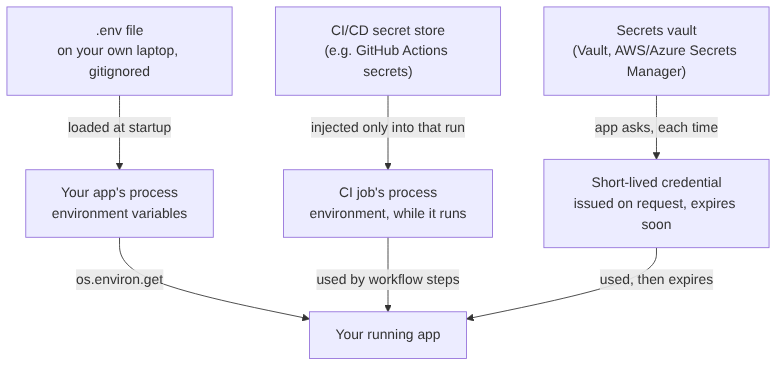
Before anything else: an environment variable is just a named piece of text, attached to a running process, that the process (and the code running inside it) can read. On your computer, if you type export DATABASE_URL=postgres://... in a terminal and then run your app from that same terminal, your app can read DATABASE_URL back out with something like Python’s os.environ.get("DATABASE_URL"). That’s it. There’s no encryption involved, no special protection — it’s just a convenient, standard way to hand a running program some configuration without writing it into the program’s own source code.
That last property — “without writing it into the source code” — is the entire reason this pattern exists for secrets. It means the secret doesn’t get committed to git, doesn’t show up in a git blame, and can be different on your laptop, your colleague’s laptop, and the real production server, without anyone having to edit a single line of code to make that happen.
Layer one: .env files on your own machine
Typing export SOMETHING=value into your terminal every time you restart your app gets old fast, which is why most projects use a .env file: a plain text file, usually at the root of the project, with one NAME=value pair per line. A library — python-dotenv in Python, dotenv in Node — reads that file when your app starts and loads each line into the environment automatically, so you type the values once and forget about it.
The rule that matters here, and the one most beginner mistakes break, is simple: a .env file must never be committed to git, and must never be deployed into a folder your web server serves publicly. Both of those were already covered in the Security Misconfiguration article in the main series, so this isn’t new advice — it’s the same rule, just now with the full picture of why .env files exist in the first place.
Layer two: CI/CD secrets, and the leak nobody means to cause
Once your project has a CI/CD pipeline — GitHub Actions, GitLab CI, or similar, running your tests and deployments automatically — it needs its own secrets too: a token to deploy your site, credentials to talk to a cloud provider, perhaps an API key for a service your tests touch. These platforms all offer a secret store built for exactly this: you paste a value in once, through the platform’s settings, and your workflow file can reference it by name without the value ever appearing in your repository.
The part that catches people out, though, is this: a CI/CD secret is only as safe as every single step of the workflow that can touch it, and the platform’s automatic protection is weaker than it looks. GitHub Actions, for instance, automatically “masks” a secret’s exact text in the log output — if the literal value appears, it’s replaced with ***. That sounds like real protection. It isn’t, for a couple of concrete reasons:
- Masking only catches the exact string. If a step in your workflow transforms the secret even slightly before printing it — base64-encodes it, reverses it, prints just half of it — the masking doesn’t recognise the transformed output as the secret, and it goes straight into the log, fully readable.
- Masking applies to logs, not to other side effects. If a step uploads the secret as a build artifact, writes it into a file that gets published, or passes it as a command-line argument to another program that logs its own arguments, none of that goes through the masking at all.
A short, realistic example of the first failure mode — a workflow step that was only ever meant to help debug a deployment, and ended up printing a usable secret anyway:
# .github/workflows/deploy.yml - a debugging step someone added
# temporarily and forgot to remove
- name: Debug the deploy token (oops)
  run: |
    echo "Token starts with: ${DEPLOY_TOKEN:0:4}"
    echo "Token length: ${#DEPLOY_TOKEN}"
    echo "Base64 for debugging: $(echo -n $DEPLOY_TOKEN | base64)"
  env:
    DEPLOY_TOKEN: $
The first two lines look harmless — a few characters, a length, surely that’s fine. The third line is the real problem: GitHub’s masking looks for the literal DEPLOY_TOKEN value in the output, but base64 of that value is a completely different string, so it sails straight past the masking filter and sits in the log in plain, fully-reversible text, readable by anyone with access to view that workflow run’s log. Nobody intended to leak the token. The masking just doesn’t understand “the same secret, lightly disguised.”
The fix for this layer is mostly discipline rather than a different tool: never print a secret or any transformation of it, even “just a bit of it, for debugging,” because there’s no reliable way to know in advance which transformation defeats the masking and which doesn’t. Treat $ (or your platform’s equivalent) as something that only ever flows directly into the one place it’s needed — an environment variable for the actual deploy command, a header for the actual API call — and nowhere else, ever, not even in a log line you’re sure nobody will read.
Layer three: secrets vaults, for when “an environment variable” isn’t enough
Both of the layers above share a limitation: the secret is a long-lived, static value, sitting in one place, valid until someone manually changes it. That’s fine for a small project. It becomes a real liability once more than a couple of people or systems need access, because now there’s a single, unrotated credential that, if it ever leaks — through any of the routes above, or simply because someone who left the team still has a copy — stays valid indefinitely, with no record of who used it when.
A secrets vault — HashiCorp Vault, AWS Secrets Manager, Azure Key Vault, and similar tools — solves this differently. Instead of handing out one static secret that lives forever, your app asks the vault for a credential at the moment it needs one, and the vault issues something short-lived: a database password that expires in an hour, an API token valid for this one deployment only. Two things fall out of that design that a static .env value can never give you: every access is logged, because the app had to ask for the credential rather than already having it, so there’s a full audit trail of who (or what) requested which secret, when; and a leaked credential self-destructs, because even if someone does manage to copy it out of a log or a crashed process, it stops working on its own, usually well before anyone would get round to using it maliciously.
This is more infrastructure than most solo projects need on day one — don’t reach for a vault to protect one Flask app’s database password. But it helps to know the shape of the solution exists, because the trigger for needing it is usually “more than one person or automated system now needs access to this secret,” which happens to a lot of small projects faster than their creators expect.
Why this fix exists
Putting configuration in environment variables went mainstream with the Twelve-Factor App, a set of practices written up by people at Heroku around 2011, which said that config which changes between deployments belongs in the environment, not the code. The point was partly security and partly sanity: the same code could run anywhere, and the secrets stayed out of version control. .env files followed as a convenience for local development, CI systems added encrypted secret stores once builds started deploying to production on their own, and vaults arrived for organisations with so many secrets that “an environment variable on each server” had become a risk in itself. Each layer in this post exists because the one before it ran out of room.
My take
Secrets are the boat’s keys, and the commonest way to lose them is still leaving them in the ignition, which in software means a committed .env file or a key pasted into the code. I’d make sure .env is in .gitignore, keep production secrets in your host’s or your CI’s secret store, and never print one in a build log, not even “just the first few characters, to check”. I wouldn’t stand up a vault for a single Flask app with one database password. When you’ve got several services, several people and secrets that need rotating on a schedule, a vault becomes the purpose-built tool for a real problem, and it’ll be worth the extra moving part.
Check your own setup
- “Search this repository’s CI/CD workflow files for any step that prints, logs, or writes a secret to a file — including anything that encodes, hashes, or partially slices a secret value before outputting it, since that can bypass automatic log masking.”
- “List every secret this project depends on — in
.envfiles, in CI/CD settings, anywhere else — and for each one, say how long it’s been unchanged and who currently has access to see or change it.” - “If this project has grown to the point where several people or several automated systems need their own access to the same secrets, would a secrets vault with short-lived credentials be a reasonable next step, and what would the smallest version of that migration look like?”
The core lesson carries over from the rest of this series unchanged: a secret stored safely is only as safe as every single place it subsequently flows through. An environment variable is a good first step away from hardcoding. It was never the finish line.
Before anything of mine goes live, I check that every secret lives outside the code and outside the repository, and that no build step prints one.
Tested: the workflow step parses as valid YAML, and run in a shell with a dummy token it printed the first four characters, the length, and the full base64 form. I haven’t run it on GitHub Actions, so the log-masking behaviour described above comes from GitHub’s documentation, not from my own run. Code: gist.
Next in the series: Injection — what happens when the words someone types into a search box get treated as instructions instead of data.
This post is part of the OWASP Top 10 for Vibe Coders series; the first post introduces the series and what’s in it.