OWASP Top 10 for Vibe Coders, Part 9: Software Supply Chain Failures (A03:2025)
You probably wrote a few hundred lines of your app. You’re trusting a few hundred thousand lines you never read at all.
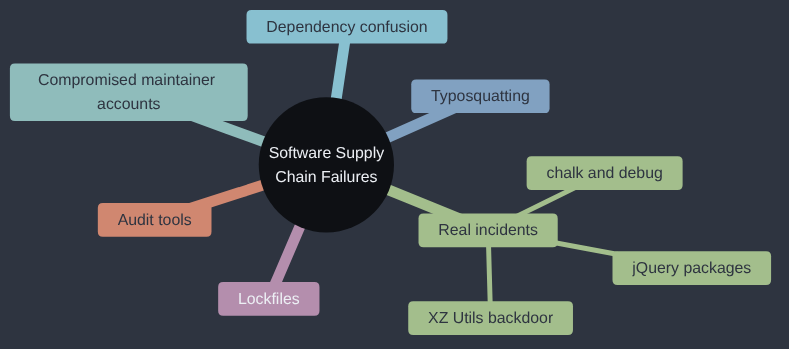
Software Supply Chain Failures is A03:2025 in the OWASP Top 10; OWASP’s own page for it goes into more depth if you want to read further.
Last year this category stopped being theoretical for us. The npm package chalk had bad versions pushed out, in the compromise this article comes back to further down. Chalk is a small library for colouring text in a terminal, the sort of thing nobody thinks about, and that turned out to be the problem. The bad versions were pulled within hours, but it still took us about a week to be sure that nobody had installed one, either directly or, far more awkwardly, through something else that depended on it. So many packages lean on chalk that most of that week went on the second question, which is the part of supply chain risk this article spends most of its time on.
If you install whatever package the tutorial, or the assistant, told you to and move straight on, this one is for you.
Open your Sticker Shop project and look in its virtual environment folder. Flask itself depends on other packages. Those depend on others. By the time you add a payment library, an image-resizing tool, and a couple of handy utilities, a “small” app can easily be running tens of thousands of lines of code you never wrote, never read, and never reviewed — because you installed it with one line: pip install something.
That’s not a criticism. Nobody writes everything from scratch, and they shouldn’t — reusing well-built, well-tested code is one of the best things about modern programming. But it creates a quiet, important fact about your app’s security: every package you import runs with the same permissions as your own code. It can read your files, read your environment variables, make network requests, anything your app itself can do. You’re not just borrowing functionality. You’re extending complete trust to a stranger.
Where that trust gets abused
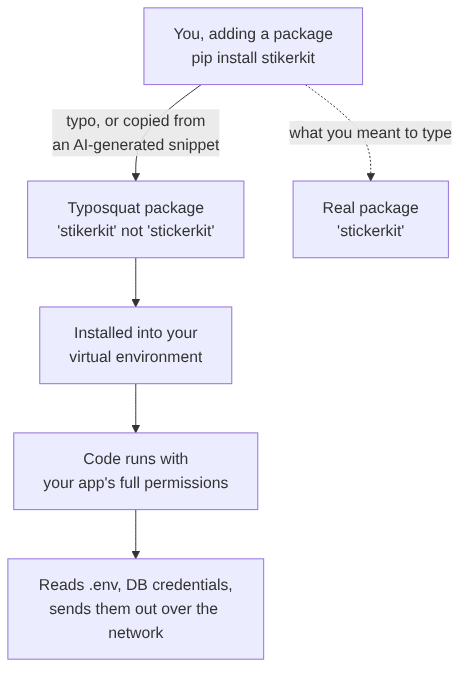
A few ways that trust gets abused in practice:
- Typosquatting. An attacker publishes a package with a name one character off from a popular one —
reqeustsinstead ofrequests,flskinstead offlask. Type the package name fast, or copy it wrong from a snippet (including one an AI assistant generated with a plausible-but-wrong name), and you install the impostor instead. - Dependency confusion. If your company has an internal package called, say,
acme-utils, and it isn’t also claimed on the public package index, an attacker can publish their ownacme-utilspublicly. If your build is ever misconfigured to check the public index as well as (or instead of) your private one, it can quietly pull in their version instead of yours. - A legitimate package goes bad. Sometimes the attacker doesn’t write a new package at all — they compromise the account of someone who maintains a real, trusted, widely-used one, and slip a malicious update into the next ordinary-looking release.
In every case, the delivery mechanism is the same: the malicious code runs the moment the package is installed or imported, with full trust, and does something you never asked for.
What a malicious package actually looks like
There’s nothing exotic about it. It’s a handful of lines, usually hidden inside code that otherwise does exactly what the package claims to do, so a quick glance looks completely normal. Here’s a harmless illustration of the shape of the problem — not a working attack, just what the pattern looks like, so you know what to be alert to in a diff on a dependency update:
# Inside a package's __init__.py - runs automatically on `import`
import os

def _check_in():
    """Looks like harmless telemetry. Isn't."""
    secrets = {
        "db_url": os.environ.get("DATABASE_URL"),
        "api_key": os.environ.get("STRIPE_API_KEY"),
    }
    # A real malicious package would send `secrets` to a server
    # the attacker controls. This one just shows what it found,
    # to make the point without actually sending anything anywhere.
    print(f"[would exfiltrate]: {secrets}")

_check_in()  # runs the instant something does `import this_package`
Notice what makes this dangerous: nothing about import this_package looks suspicious. You didn’t call a function named steal_secrets(). The code ran because importing a Python package runs its top-level code automatically — that’s simply how Python works, and it’s exactly what a legitimate package’s setup code relies on too. The danger isn’t in any one line; it’s in the fact that you extended complete trust to code you never looked at, the moment you typed pip install.
Reducing how much blind trust you hand out
You can’t read every line of every dependency — nobody does, not even professional security teams. But you can make the typo-and-confusion version of this attack much harder, and catch a bad update before it reaches production:
Pin your dependencies with a lockfile, and commit it. A requirements.txt that just says flask lets pip install grab whatever the newest version happens to be, the day you happen to run it — including a version published five minutes ago by someone who just compromised a maintainer’s account. A proper lockfile (pip freeze > requirements.txt, or better, a tool like pip-tools, Poetry, or uv) pins an exact version, so installs are reproducible, and nothing changes under you silently. This isn’t a Python-only idea — it’s how every modern package manager works. A JavaScript project gets the same protection from committing its package-lock.json (npm) or yarn.lock (Yarn); a .NET project from its packages.lock.json; a Go project already gets it close to automatically from go.sum. Whatever language you’re in, the question is the same: is there a file, committed to your repository, that pins the exact version of every dependency — not just its name?
Check a new package before you add it, not after. Before running pip install on something unfamiliar — especially something an AI assistant suggested — a thirty-second look at its PyPI page tells you a lot: how many people download it, how long it’s existed, whether the name is exactly right, whether the maintainer looks established.
Let a tool watch for known-bad versions. pip-audit checks your installed packages against a public database of known vulnerabilities in seconds:
pip install pip-audit
pip-audit
Every major ecosystem ships the same kind of tool, built into its own package manager, so this isn’t something you only get if you happen to be writing Python: a JavaScript project runs npm audit, a .NET project runs dotnet list package --vulnerable, and a Go project runs govulncheck. Whichever one matches your project, the habit is the same.
It won’t catch a brand-new malicious package the same day it’s published — nothing will — but it reliably catches the far more common case: a dependency with a known, disclosed problem that you simply haven’t updated past yet.
How this plays out for real
This isn’t a hypothetical risk category. Real, widely-used open-source packages have had their maintainer accounts compromised and a malicious update pushed out under the real package’s real name, downloaded automatically by every project that didn’t pin an exact version. Real typosquatted packages have sat on public package indexes for months, quietly collecting installs from people who mistyped one letter, before anyone noticed and had them removed.
A few recent, well-documented examples, named because each one shows a different shape of this same problem:
- Trojanized jQuery packages (2024). Dozens of npm packages with deceptive names (
cdnjquery,jquertyi, and similar) bundled a modified copy of jQuery that quietly sent a visitor’s form data to an attacker-controlled server the moment a common animation function was used — a disguised, impostor package rather than a compromise of the real one. (The Hacker News) - The
chalkanddebugnpm compromise (September 2025). A maintainer behind several hugely popular npm packages — includingchalkanddebug, together downloaded well over a billion times a week — was tricked by a phishing email into handing over publishing access. The attacker pushed malicious versions containing a cryptocurrency-stealing payload; they were caught and pulled within about two hours, but the packages were popular enough that the exposure window still mattered. (Palo Alto Networks Unit 42) - The XZ Utils backdoor (2024). The most sophisticated example on this list: an attacker spent roughly two years building trust as a co-maintainer of a widely used compression library before quietly inserting a deliberate backdoor, hidden in the build process rather than the readable source code, that would have given remote attackers a way into an enormous number of Linux servers via SSH. It was caught by one engineer noticing a small, unexplained slowdown — not by any automated tool. (CVE-2024-3094, Picus Security)
For a solo developer, the far more ordinary version of this sequence looks almost boring from the outside: you run pip install while following a tutorial or pasting a snippet an AI assistant suggested, the install succeeds without complaint exactly like every other install you’ve ever run, and the only sign anything happened is — often — nothing at all, for weeks, until a credential that was sitting in your .env file turns up being used somewhere you never authorised. The quiet is the point. A supply chain attack doesn’t want to be noticed; it wants to sit inside something you already trust completely, for as long as possible.
Why this fix exists
Package managers were built to make sharing code easy, and they succeeded so well that for years nobody much asked who they were trusting. Two incidents on npm changed that. In 2016, a developer removed a tiny package called left-pad from the registry, and builds broke across the internet, because thousands of projects had quietly come to depend on eleven lines of somebody else’s code. Nothing malicious happened, but it showed how deep the dependency chains went. In 2018, the popular event-stream package was handed over to a new maintainer, who added code aimed at a particular cryptocurrency wallet. Lockfiles, which pin the exact versions you’ve tested, became standard in npm in 2017, and pip has a hash-checking mode that makes an install fail if a package’s contents change. Pinning and hashes exist because “the latest version” turned out to mean “whatever someone published most recently”.
My take
Every package you install is crew you’ve taken aboard without an interview, and most of them are perfectly decent. I’m not going to tell you to read the source of every dependency, because nobody does, and advice nobody follows is worse than none. What I’d do is smaller: know who’s on your crew list, pin the versions you’ve tested, run pip-audit before a release, and pause for ten seconds over any package name an AI assistant suggests that you’ve never heard of. I’d hold off on software bills of materials, private package mirrors and signing infrastructure until you’ve got enough projects that keeping track by hand stops working. Those tools are good, and they were built for organisations with hundreds of repositories, which is a much bigger boat with a much bigger crew.
Check your own code
- “Look at this project’s requirements file (or lockfile). Are dependency versions pinned exactly, or left open (like just
flaskwith no version)? List any that aren’t pinned.” - “Go through my list of dependencies and flag any package names that look like they could be a typo of a much more popular package name — check carefully, letter by letter.”
- “Run
pip-audit(or the equivalent audit tool for this project’s language —npm audit,dotnet list package --vulnerable,govulncheck) against this project’s dependencies and summarise anything it finds, in plain language, with how serious each one is. Then suggest how to run this same check regularly — for example as a scheduled step in CI, or a weekly reminder — rather than just once, since new vulnerabilities get disclosed in existing packages all the time.”
You’ll never personally audit every line your dependencies run. The goal isn’t that — it’s making sure the easy, cheap version of this attack (a typo, an unpinned version, a known vulnerability nobody updated) doesn’t work against you.
Before anything of mine goes live, I pin the dependencies and run an audit over them, and I make sure someone does it again every few months. There are also tools that will do this for you, such as Dependabot, so use them.
Tested: importing the example package printed the “[would exfiltrate]” line, with the values of both environment variables, and nothing else was needed beyond the import. pip-audit 2.10.1, run against this series’ pinned dependencies on 16 October 2026, reported no known vulnerabilities. Typosquatting and dependency confusion are described, not reproduced. Code: gist.
Next in the series: Software or Data Integrity Failures — what happens when your app trusts something it received without ever checking it wasn’t tampered with on the way.
This post is part of the OWASP Top 10 for Vibe Coders series; the first post introduces the series and what’s in it.