OWASP Top 10 for Vibe Coders, Part 10: Software or Data Integrity Failures (A08:2025)
Your app trusted something it was handed, without checking where it had actually been. Here’s why that one habit can hand over the whole server.
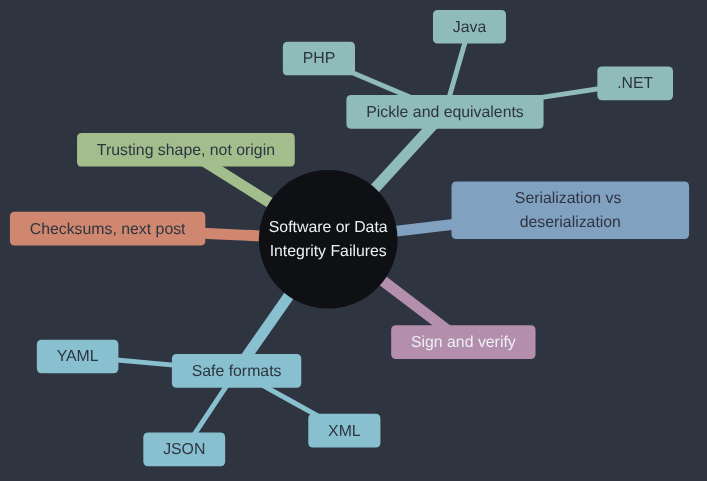
Software or Data Integrity Failures is A08:2025 in the OWASP Top 10; OWASP’s own page for it goes into more depth if you want to read further.
Years ago, it was normal practice to check a downloaded file’s checksum against the one published on the website, and I dutifully did. Unfortunately, the site I was checking against wasn’t the right site. So I compared my flawed download with a flawed website, the hashes matched perfectly, and the file was still wrong. I’d checked that the data matched something; I hadn’t checked where that something came from. That gap, between data looking right and data coming from where you think it did, is what this category is about.
If your app reads something back out of a cookie, a file or a queue and trusts it because it wrote it in the first place, this one is for you.
Every piece of data your app works with came from somewhere. Sometimes that’s obviously “the user, right now, through a form” — and by this point in the series, you’re used to treating that with suspicion. But data also arrives in less obvious ways: something read back out of a cookie, a file loaded from storage, an update downloaded from the internet. This category is about what happens when your app trusts one of those without checking it hasn’t been tampered with in between.
What “serialization” actually means
Before the example, two words worth defining properly, because the rest of this article leans on them: serialization is turning a live thing your program is working with right now — an object in memory, a cart full of items, a logged-in session — into a flat, storable, sendable format: a string of text or a stream of bytes. Deserialization is the reverse: taking that flat format back and turning it into a live thing your program can work with again. Every time your app saves something to a cookie, a file, or a database and reads it back later, this round trip is happening, whether you think of it in those terms or not.
Most of the time, this happens through a data-only format — one that can only ever represent plain values (text, numbers, true/false, lists, and nested combinations of those), with no concept of “code” at all. JSON is the one you’ll meet most often on the web: {"item": "sticker pack", "quantity": 3} is JSON, and it’s just text, readable by a human, safely representing exactly that data and nothing more. YAML is a close cousin, often used for configuration files, slightly more flexible in what it can express. XML is an older, more verbose format that does a similar job with tags instead of punctuation. All three share the important property this article cares about: deserializing one of them can only ever hand you data — there’s no way for the text itself to make your program do something it wasn’t already going to do.
The danger in this article comes from a different, more powerful kind of format: one that doesn’t just store data, but can store a live object’s full internal state, including instructions for how to rebuild itself. Most major languages have one. Python has pickle. Java has its built-in object serialization (classes marked Serializable), which was the basis of a wave of serious real-world “Java deserialization” attacks around 2015–2018. PHP has serialize()/unserialize(), where the same category of bug is usually called “PHP Object Injection.” .NET had BinaryFormatter, which Microsoft now explicitly advises against using on untrusted data at all, and has been phasing out of the framework for exactly this reason. Different name in every language, same underlying shape of risk: a format that can rebuild behaviour, not just data, deserialized without checking where it came from.
This article uses Python’s pickle as the concrete example, because it’s the clearest one to show in a short, complete script — but if your own project is in a different language, don’t read this as “not my problem.” Look for whichever one of the names above applies to what you’re using, and treat it with the same suspicion.
Python’s version of this risk: pickle
Python ships with a wonderfully convenient module called pickle, which can turn almost any Python object — a dictionary, a custom class instance, a whole data structure — into a stream of bytes, and turn it back into a live object later with pickle.loads(). It’s useful for quickly saving and restoring your own data, inside a system you fully control.
It is also, by the Python documentation’s own explicit warning, unsafe to use on any data that came from somewhere you don’t fully trust. The reason is a sharper example than most of this series, so it’s worth a moment: pickle.loads() doesn’t just rebuild simple data. It can rebuild an object that, as part of being rebuilt, runs code — because Python objects are allowed to define a special method, __reduce__, that controls exactly how they reconstruct themselves, and that reconstruction step is allowed to call any function at all.
Say Sticker Shop lets logged-in users “save their cart for later” by pickling the cart and storing it in a cookie, then loading it back with pickle.loads() on the next visit — a design that feels harmless, because it’s “just your own data, round-tripping.” Here’s what a malicious cookie value could contain instead:
import pickle
import os

class MaliciousCart:
    def __reduce__(self):
        # __reduce__ tells pickle: "to rebuild me, call this function
        # with these arguments." It doesn't have to be a safe function.
        return (os.system, ("echo PWNED > /tmp/proof.txt",))

# This is what an attacker builds, once, offline.
malicious_cookie = pickle.dumps(MaliciousCart())

# This is what the vulnerable server does with ANY cart cookie it's
# handed - including one it never created and never signed.
pickle.loads(malicious_cookie)  # runs os.system(...) - not "rebuilds a cart"
Nothing about pickle.loads(malicious_cookie) looks dangerous to read. It’s one line, and it’s the exact line the app was always going to run to restore a saved cart. The danger isn’t in that line — it’s in everything upstream of it: the fact that the byte string being deserialized could have come from anyone, and pickle will faithfully run whatever reconstruction instructions it’s given, no questions asked. os.system("echo ...") here just writes a harmless file to prove the point; a real attacker’s payload calls whatever it likes, with the same permissions your Flask app itself runs with.
The underlying mistake: trusting shape without trusting origin
The thing that makes this an integrity failure specifically, rather than a design or injection failure, is the nature of what went wrong: the app received data that looked like a legitimate, well-formed cart, and never checked whether it had been tampered with, or where it had actually come from. It trusted the data because it had the right shape, not because its origin had been verified.
The mistake shows up well beyond pickle:
- Downloading and running an “update” without verifying it. If your app or a script you’ve written fetches a file from the internet and runs it, with no check that the file is actually the one you meant to fetch — unchanged, from the real source — anyone able to intercept or redirect that download (a compromised mirror, a man-in-the-middle on the network) can hand you something else entirely.
- A CI/CD pipeline that trusts a build artifact produced somewhere upstream, with no checksum or signature confirming it matches what was actually reviewed and approved. A checksum is a short, fixed-length fingerprint calculated from a file’s contents — change even one byte of the file and the checksum comes out completely different — so comparing “the checksum I expected” against “the checksum of what I actually received” is a cheap, reliable way to catch a file that’s been altered or substituted in transit, without needing to re-read the whole thing by eye. (Checksums and file-signing deserve a full article of their own; this series will come back to them in more depth.)
- Deserializing untrusted JSON or YAML into application objects using a loader that can also execute code —
yaml.load()with its default loader has had almost exactly thispickle-style danger in the past, which is why modern guidance is to always useyaml.safe_load()instead.
Why this one is worth taking seriously, not just noting
It’s tempting to file pickle.loads() on untrusted data under “theoretical” — surely nobody’s cart cookie is actually malicious, most of the time. That’s true, and also exactly why this bug is so dangerous: it costs the app nothing until the one time it matters, and the one time it matters, the outcome isn’t “a wrong answer” or “an exposed record” the way most of this series has covered so far — it’s arbitrary code execution on your server, with whatever permissions your app itself runs with. That’s about as bad as a single bug can get: read every file the app can read, write anything the app can write, reach any database or internal service the app can reach, all from one crafted cookie value, with no password, no session, no prior access required at all. It’s precisely because the ceiling is so high that “never deserialize data you don’t fully control” is worth treating as a hard rule, not a judgement call to make case by case.
Fixing it: never deserialize what you can’t verify
For Sticker Shop’s saved-cart example, the fix has two independent layers, and using both is the right habit:
Don’t use pickle for anything that leaves your server’s full control. For data that round-trips through the browser — cookies, anything a user could edit — use a format that can only represent data, not executable reconstruction instructions. json.loads() is the obvious choice: it can only ever produce plain dictionaries, lists, strings and numbers. There’s no equivalent of __reduce__ for JSON to abuse, because JSON simply has no concept of “run this to rebuild me.”
import json
cart = json.loads(cookie_value)  # can only ever produce plain data
Sign anything you do send back to the user, and verify the signature before trusting it. Flask’s own session cookies already do exactly this: they’re signed using your app’s SECRET_KEY, so if a user edits the cookie by hand, the signature no longer matches and Flask rejects it outright. The same pattern — sign what you send out, verify it the moment it comes back — applies to any data you hand to a user and expect to trust later.
from itsdangerous import URLSafeSerializer
signer = URLSafeSerializer(app.config["SECRET_KEY"])

token = signer.dumps(cart_data)          # safe to hand to the browser
cart_data = signer.loads(cookie_value)   # raises if it's been tampered with
Why this fix exists
Turning objects into bytes and back again has been around as long as programs needed to save their state, and for most of that time the bytes were trusted because they’d come from the same program. The web broke that assumption: the bytes started arriving in cookies, form fields and network messages. In 2015, Chris Frohoff and Gabriel Lawrence gave a talk called “Marshalling Pickles”, showing that the same idea that makes pickle.loads() dangerous worked against Java libraries used all over the enterprise world, and a wave of serious vulnerabilities followed. OWASP added Insecure Deserialization to the Top 10 in 2017 and folded it into Software and Data Integrity Failures in 2021. Signed cookies and plain formats like JSON are the fix that came out of it: check where data came from before doing anything with it, and use a format that can’t carry code.
My take
Unpickling data from a stranger is accepting a sealed crate on the quayside and stowing it below without opening it, because the label looked right. I’d go through the app looking for pickle.loads, yaml.load without the safe loader, and anything else that rebuilds objects from bytes, and treat every one that touches outside data as a hole already in the hull. JSON plus a signature, using itsdangerous, which Flask already ships with, covers nearly every case a small app has. I wouldn’t build a signing service, a key-rotation scheme or a message-integrity framework yet. When you’ve got several services passing data to each other and keys that need rotating, that’s the problem those tools were built to solve, and you’ll know because keeping track by hand will have started to hurt.
Check your own code
- “Search this codebase for every use of a native or binary deserialization function — Python’s
pickle.loads/pickle.load,yaml.loadwithoutsafe_load, oreval/exec; Java object deserialization; PHP’sunserialize(); .NET’sBinaryFormatter; or the equivalent for whatever language this project is actually written in. For each one, trace back where the data being loaded actually comes from - is any of it a cookie, form field, uploaded file, or anything else a user could have supplied or edited?” - “Check whether any cookies this app sets and later reads back are signed or otherwise tamper-proofed, or whether their contents are trusted as-is once decoded.”
- “If this project downloads or installs anything from the internet at build or deploy time (a script, an update, a dependency outside the normal package manager), check whether its integrity is verified - a checksum or signature - before it’s used.”
Tested (Python 3.12.8 and Flask 3.1.3, itsdangerous 2.2.0): the pickle script ran its shell command on my machine, and a forged, unsigned cart cookie did the same when handed to a cart route that called pickle.loads. With the signed cookie, the forged value was rejected, a tampered one returned a 400, and an honest cart round-tripped fine. Code: gist.
Next in the series: Checksums — the small, dull check that proves a download is the file its publisher meant you to have.
This post is part of the OWASP Top 10 for Vibe Coders series; the first post introduces the series and what’s in it.