OWASP Top 10 for Vibe Coders, Part 12: Security Logging and Alerting Failures (A09:2025)
Every other article in this series is about stopping an attack. This one is about what happens if you don’t manage to — because right now, for most small apps, the honest answer is “nobody would ever know.”
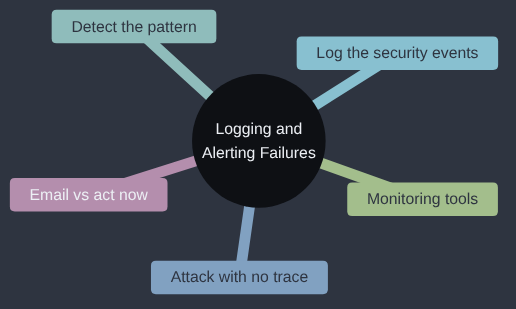
Security Logging and Alerting Failures is A09:2025 in the OWASP Top 10; OWASP’s own page for it goes into more depth if you want to read further.
My biggest lesson from logging and alerting is that I’ve never quite found the balance point. You either get so many logs that nobody can read them, or so few that they don’t explain the problem when it happens, and getting between the two is always harder than it sounds. The one thing I’m sure of is that a person reading logs by hand doesn’t scale, so automating the reading, and the alert that comes out of it, is what makes any of it worth collecting.
If you’d currently hear about a break-in from a customer before you heard about it from your own app, this one is for you.
An uncomfortable truth to start with: no app is perfectly secure. Not yours, not a bank’s, not a government department’s. Every piece of advice in this series reduces risk — it doesn’t eliminate it. Which means the question “what happens when, despite your best efforts, someone still gets in or still tries?” matters just as much as any of the prevention advice that came before it.
Security Logging and Alerting Failures is about exactly that moment. It isn’t about stopping an attack. It’s about whether anyone — you — ever finds out one happened at all.
An attack that worked, and left no trace
Go back to the brute-force script from the Authentication Failures article: a loop trying password after password against a login form with no rate limiting. Now imagine that same attack against an app that does have rate limiting, but has never written a single security-relevant event to a log anywhere. The attack takes longer this time — maybe it’s spread out over a whole weekend, a few guesses a minute, specifically to stay under the radar — but it still eventually finds the right password.
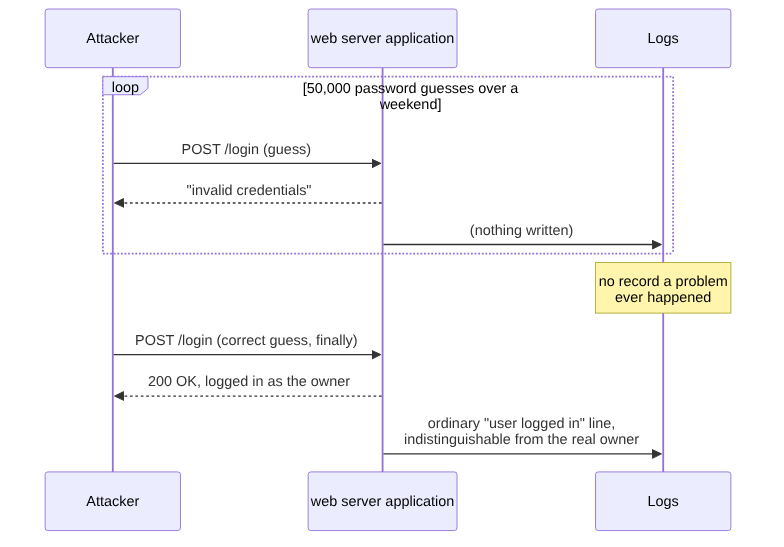
Notice what’s frightening about that picture: it isn’t that the attack happened. It’s that the successful login, the one where the attacker actually got in, looks in your logs — if you have any logs at all — completely identical to the account owner logging in normally. There’s no way to look back afterwards and even see that anything unusual occurred, because nothing about “someone logged in” was ever recorded as unusual, and the 49,999 failed guesses before it, the only part of this story that actually looked like an attack, were never written down anywhere to begin with.
What a web app logs by default — and why it isn’t enough
A fresh web app, in pretty much any framework or language, will typically log basic request information out of the box: the path visited, the status code, maybe the method. That’s useful for debugging a crash. It tells you almost nothing useful for security, because it has no concept of what’s meaningful. A failed login attempt and a successful one both just look like “a POST to /login happened” unless your own code specifically decides to say more.
The gap, made concrete — the vulnerable version of the login route logs nothing security-relevant at all:
@app.route("/login", methods=["POST"])
def login():
    user = authenticate(request.form["email"], request.form["password"])
    if user:
        session["user_id"] = user.id
        return redirect("/account")
    return "Invalid credentials", 401
It works correctly. It’s just silent. Nothing here ever creates a record that someone tried, and failed, to log in — which means nothing ever accumulates into the pattern that would reveal an attack in progress.
Logging what actually matters, and reacting to it
The fix has two separate parts, and skipping either one leaves you half-protected: recording the right events, and reacting when they form a pattern. Recording alone isn’t enough either — a log file nobody ever looks at is barely better than no log file at all.
First, log the events that actually matter for security, with enough detail to spot a pattern later:
import logging
security_log = logging.getLogger("security")

@app.route("/login", methods=["POST"])
def login():
    user = authenticate(request.form["email"], request.form["password"])
    ip = request.remote_addr
    if user:
        security_log.info(f"login success: user={user.id} ip={ip}")
        session["user_id"] = user.id
        return redirect("/account")
    security_log.warning(f"login FAILED: email={request.form['email']} ip={ip}")
    return "Invalid credentials", 401
That’s a small change — two added log lines — but it turns an invisible pattern into a visible one. A dozen login FAILED lines for the same email address inside a minute is no longer a silent event. It’s a line in a file you can actually look at, grep through, or — better — feed into something that watches for you.
One caution about that email= line: it writes whatever the user typed straight into your log, and a user can type a line break. Someone who submits an “email” containing a newline followed by login success: user=1 has just added a convincing fake entry to your security log, which is called log injection. Before logging anything a user supplied, strip or escape the line breaks, for example by logging {request.form['email']!r} so Python writes the value with its newlines shown as \n rather than acted on.
Second, something has to actually watch the logs and raise a flag, because nobody reads a log file line by line in real time. Even a very simple version of this closes most of the gap. Here’s a small script that reads a log file and flags accounts with a suspicious number of recent failures — the kind of thing you could run on a schedule, or as a starting point for a proper alerting tool:
import re
from collections import Counter

LOG_FILE = "security.log"
THRESHOLD = 10  # failures from one email before we consider it suspicious

failures = Counter()
with open(LOG_FILE) as f:
    for line in f:
        match = re.search(r"login FAILED: email=(\S+)", line)
        if match:
            failures[match.group(1)] += 1

for email, count in failures.items():
    if count >= THRESHOLD:
        print(f"ALERT: {count} failed login attempts for {email}")
Sixteen lines, and it’s the difference between “an attack happened and nobody noticed for months” and “an attack happened and you had a chance to respond within minutes.” A real setup would send that alert somewhere you’d actually see it — an email, a Slack message — rather than just printing it, but the underlying idea doesn’t need to be any more complicated than this to be useful.
Why the gap stays invisible for so long
What makes this category unusually costly is the delay. How long that delay is depends on who’s counting. IBM’s Cost of a Data Breach Report 2025 puts the average time to identify and contain a breach at 241 days, which is months by anyone’s measure. Mandiant’s M-Trends 2025 reports a much shorter median dwell time of 11 days, partly because ransomware gangs announce themselves, and it is still 26 days when the organisation only hears about it from someone outside. Either way, the organisations in those reports mostly have dedicated security teams. A solo developer with no logging at all isn’t measuring that gap in months; without logging, there often isn’t a discovery at all, unless the consequence becomes visible some other way — a customer complaint, a bank flagging fraudulent charges, stock mysteriously vanishing from inventory. By the time any of those happens, the attacker has usually had free run of whatever they found for a long time already. Logging doesn’t prevent the initial break-in. What it buys you is the difference between finding out in an afternoon and finding out by accident, much later, after the damage has already compounded.
What’s worth logging, as a starting point
You don’t need to log everything — a flood of noise is nearly as useless as silence, because the signal drowns in it. A reasonable starting list for a small app: failed and successful logins, password resets, permission or role changes, access to admin-only routes, and anything your app explicitly refuses to do because of a security check (a 403, an access-control rejection). Each of those is a moment where “did this happen normally, or does this look like an attack?” is a question worth being able to answer later.
Real monitoring tools, and when to email yourself versus act now
The sixteen-line alert script earlier in this article is a genuine starting point, not a toy — but you should know what the grown-up version of this looks like, because at some point “a script I run by hand” should become “something that watches continuously.” That’s what monitoring tools are for: services like Sentry (error and exception tracking), Datadog, Grafana with Loki, or even your hosting platform’s own built-in logging dashboard (most, including the major cloud providers, have one) collect your logs centrally and let you set up rules — “alert me if X happens Y times in Z minutes” — without you having to write and schedule that logic yourself. Many have a free tier that’s more than enough for a small app. The habit this series has been building (log the meaningful events, then have something watch them) is exactly what these tools do for you, at a scale a hand-rolled script eventually can’t keep up with.
The harder question is what should happen once something is actually flagged, and you want to decide this in advance rather than in the middle of an incident. A reasonable rule of thumb: send yourself an email or a notification for anything that’s suspicious but not yet confirmed — a cluster of failed logins, an unusual spike in traffic to one route, a few 403s from the same address. These are worth knowing about within the hour, not the minute. Take action immediately — which might mean locking an account, rotating a credential, or temporarily taking a feature offline — for anything that’s already a confirmed compromise: a successful login immediately following a long run of failures on that account, a sudden spike in admin actions nobody on your team is doing right now, or any alert that directly follows a reported customer complaint about unauthorised activity. The dividing line is confidence: “this looks odd” earns a notification you’ll read later today; “this looks like it’s happening right now” earns stopping what you’re doing and checking immediately.
Why this fix exists
Logs started out as a tool for whoever was running the system, so they’d know what had happened when something broke; syslog, written as part of Sendmail in the 1980s, became the standard way for Unix programs to do it. Security wasn’t the point. As breaches piled up and investigators kept finding that the evidence had never been recorded, logging moved from an operations habit to a security requirement: OWASP added “Insufficient Logging & Monitoring” to the Top 10 in 2017, and the 2025 list renamed it to put alerting in the title, because a log nobody reads doesn’t help anyone. The fix in this article, log the events that matter and have something watch them, is that history in two steps.
My take
Logging is the ship’s log, and its value only shows up after something has gone wrong, which is the point at which it’s too late to start keeping one. For a small app I’d log logins, failed logins, permission refusals and admin actions, each with an IP address and a time, and I’d have a small script or a cheap hosted service email me when the numbers look wrong. That’s it, for now. I wouldn’t set up a SIEM, a log pipeline with three moving parts or a dashboard nobody looks at. Those tools exist for teams with a security operations function and more logs than any person could read, and if you get there, they’ll be the right purpose-built answer. Until then, the script in this article and an inbox you actually check will catch more than a platform you haven’t the time to open.
Check your own code
- “Search this app for its login, password-reset, and admin-access routes. For each one, check whether a failed attempt or a security-relevant rejection is actually logged anywhere - not just a generic request log, but something that specifically records that a security check failed.”
- “Does this app have anything in place - a scheduled check, a monitoring tool, even a simple script - that reviews security logs for patterns like repeated failed logins, or does logging exist with nobody and nothing ever reading it back?”
- “Check whether successful security-sensitive actions in this app (a login, a password change, an admin action) are logged with enough detail - which account, from where, when - to investigate after the fact if something turns out to have gone wrong.”
Before anything of mine goes live, I check that logins and failed logins are being written somewhere I’ll actually see them, not just to a console nobody reads.
Tested (Python 3.12.8 and Flask 3.1.3): I fired 12 failed logins at the Sticker Shop. The version without logging left no trace anywhere. The version with the security_log lines wrote 12 login FAILED entries plus one success with the IP address, and the sixteen-line script printed ALERT: 12 failed login attempts for that address. An “email” containing a newline did write a second, forged login success line into the log, and the same value formatted with !r stayed on one line. Code: gist.
Next in the series: Mishandling of Exceptional Conditions — what happens when something goes wrong, and the app’s reaction to that failure creates a second, often worse, problem.
This post is part of the OWASP Top 10 for Vibe Coders series; the first post introduces the series and what’s in it.